What an MD5 hash really checks, where it still works, and why passwords and tamper-proofing need something stronger.
When A Downloaded File Needs To Be Trusted, Not Just Opened
A teacher downloads a large resource pack from a school shared drive and the file takes several attempts before it opens without an error. An IT coordinator receives a new software installer from a vendor and needs to confirm it matches the file the vendor actually published, not a corrupted or altered copy. A computer science class is learning how data can be represented as a fixed-size fingerprint, and the teacher wants an example students can try themselves. In each case, the real question is the same: how do you know a file is exactly the file it claims to be?
This is what a hash function like MD5 is for. It does not encrypt a file, hide it, or protect it from being read. It creates a short, fixed-length fingerprint from the file's content. If even one byte of the file changes, the fingerprint changes completely. Comparing fingerprints is a fast way to check whether a download completed correctly or whether a file matches the version someone expects.
MD5 (Message-Digest Algorithm 5) is one of the oldest and most widely known hash functions. It is still used today for basic integrity checks, even though it has not been considered secure for passwords or cryptographic protection for many years. Understanding what MD5 actually does, where it is still useful, and where it should never be used helps teachers, students, and school IT staff make better decisions about file safety.
What MD5 Actually Does
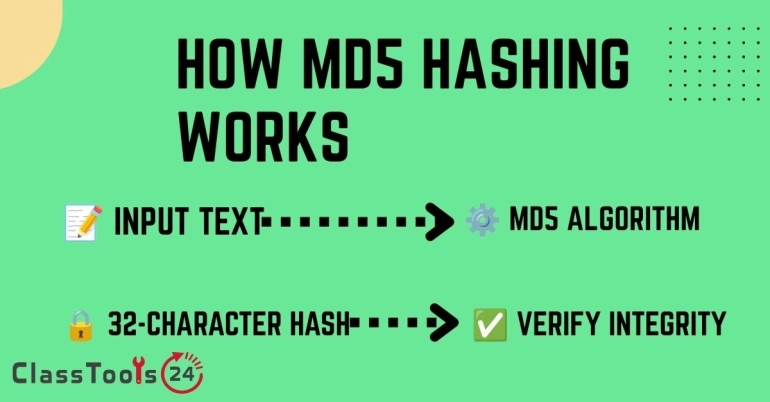
MD5 takes an input of any size, a short text, a paragraph, or an entire multi-gigabyte file, and produces a fixed-size output: a 128-bit value, almost always written as a 32-character string of letters and numbers. This output is called a hash, a digest, or a checksum.
Three properties make this useful:
- The output is always the same length. A one-line text file and a 500-page PDF both produce a 32-character MD5 hash.
- The same input always produces the same output. Hashing a file twice on two different computers should give an identical result if the file itself is identical.
- A tiny change in the input produces a completely different output. Changing a single character, space, or byte anywhere in the file changes the entire hash, not just part of it.
That last property is what makes MD5 useful for verification. If a teacher publishes a resource pack along with its MD5 hash, and a student's downloaded copy produces a different hash, something changed during the download, the file is incomplete, or it is not the same file. The hash cannot say what changed, only that it did.
Want to generate an MD5 hash from your own text or file details?
Try the MD5 Hash GeneratorWhere MD5 Is Still Genuinely Useful
MD5 has a poor reputation in security discussions, and for good reason in certain contexts covered below. But dismissing it entirely misses where it still does a reasonable job.
| Use case | Is MD5 a reasonable choice? | Why |
|---|---|---|
| Checking a download completed without corruption | Yes | No one is trying to fake a matching hash on purpose; the goal is only to catch accidental errors. |
| Confirming two files are identical copies | Yes | A quick way to compare large files without opening and reading every byte manually. |
| Storing student or staff account passwords | No | MD5 is fast and unsalted by default, which makes stored passwords easy to attack. Use a purpose-built algorithm instead (see below). |
| Verifying a file has not been deliberately tampered with by an attacker | No | MD5 collisions can be engineered on purpose, so a determined attacker can create a different file with a matching hash. |
| Teaching the concept of hashing in a computer science lesson | Yes | MD5 is simple, fast, and widely documented, which makes it an easy first example before introducing SHA-256. |
Use Case 1: Verifying a Shared Resource Pack Downloaded Correctly
Situation: A department head uploads a large bundle of worksheets, slides, and rubrics to a shared drive for other teachers to download before term starts.
Problem: Some teachers report that files inside the folder will not open, or a document looks cut off. It is unclear whether the download failed or the original file was already broken.
Solution: The department head generates an MD5 hash of the original ZIP file before sharing it and includes that hash in the message. Teachers who are unsure about their download can generate a hash of their own copy using the MD5 Hash Generator and compare it with the original.
Result: A mismatch confirms the download is incomplete or corrupted, so the teacher knows to re-download rather than troubleshoot a file that was never intact.
Use Case 2: Confirming a Software Installer Matches the Vendor's Original
Situation: A school's IT coordinator receives an installer for classroom software from a vendor's website or a third-party mirror.
Problem: Installing unverified software on school devices carries risk if the file was altered or corrupted somewhere between the vendor and the download link.
Solution: Many vendors publish a checksum alongside their download, sometimes MD5, sometimes a stronger algorithm like SHA-256. The coordinator hashes the downloaded file and compares it against the vendor's published value before installing it on school machines.
Result: A confirmed match adds confidence that the file was not corrupted in transit. If the vendor specifically publishes a SHA-256 checksum rather than MD5, that stronger algorithm should be used instead, since it also protects against deliberate tampering.
Use Case 3: Teaching Hashing Concepts in a Computer Science Lesson
Situation: A teacher introduces the idea of hash functions and wants students to see how a small text change produces a completely different output.
Problem: Cryptographic concepts can feel abstract without something students can try themselves in a lesson.
Solution: Students hash a short sentence, then change one letter and hash it again, comparing the two results side by side. This demonstrates the avalanche effect, where a tiny input change produces an unrelated-looking output, without requiring students to understand the underlying bitwise operations.
Result: Students build an intuitive, hands-on understanding of hashing before moving on to how hashes are used in real systems, including where MD5 falls short.
Why MD5 Is Not Safe for Passwords or Security-Critical Use
MD5 was designed in 1991, and cryptography has moved on considerably since then. Two well-documented weaknesses explain why it should not be trusted for anything security-sensitive:
- Collision attacks. Researchers have demonstrated that two different inputs can be deliberately engineered to produce the same MD5 hash. This means an attacker can create a malicious file that hashes identically to a legitimate one, defeating the purpose of verification in an adversarial setting.
- Speed works against password security. MD5 was designed to be fast, which is good for checksums but bad for password storage. Modern hardware can attempt billions of MD5 guesses per second, making stored MD5 password hashes comparatively easy to crack, especially without a unique salt per password.
For passwords, schools and developers should use a purpose-built password hashing algorithm such as bcrypt, scrypt, or Argon2, which are intentionally slow and designed to resist large-scale guessing. For verifying that a file has not been deliberately tampered with, SHA-256 is the current standard. MD5 remains reasonable only for catching accidental corruption, where no one is actively trying to forge a match.
How To Generate and Check an MD5 Hash
- Open the MD5 Hash Generator.
- Paste the text, or the relevant file details, into the input area.
- Generate the hash and copy the 32-character result.
- Compare it against the hash provided by the original source, such as a vendor's published checksum or a colleague's original file hash.
- If the hashes match, the content is identical. If they do not match, treat the file as incomplete, corrupted, or different from the original, and re-download or re-request it.
- For anything involving passwords or protection against deliberate tampering, use a stronger, purpose-built algorithm instead of MD5.
Common Problems This Solves
- A downloaded resource pack or installer will not open correctly.
- Two team members are unsure whether they have the same version of a file.
- A file needs a quick integrity check without manually comparing content line by line.
- A computer science lesson needs a simple, hands-on hashing example.
- A school needs to understand why MD5 should never be used for password storage.
Common Mistakes To Avoid
- Using MD5 to store student or staff passwords.
- Assuming a matching MD5 hash proves a file was not deliberately tampered with by an attacker.
- Treating MD5 and encryption as the same thing; MD5 hashes cannot be reversed back into the original content, but they also do not hide or protect it.
- Ignoring a vendor's published SHA-256 checksum in favor of an easier-to-find MD5 value.
- Sharing sensitive file contents assuming a hash provides any confidentiality; it does not.
Frequently Asked Questions
What is MD5 used for today?
Mainly for quick, non-adversarial checks: confirming a download completed correctly, checking that two files are identical copies, and teaching hashing concepts. It is not recommended for passwords or protecting against deliberate tampering.
Is MD5 the same as encryption?
No. Encryption is reversible with the correct key, so the original content can be recovered. MD5 hashing is one-way; you cannot turn a hash back into the original file or text. It also is not designed to keep content secret, only to fingerprint it.
Why is MD5 considered insecure?
Researchers have shown that different inputs can be deliberately crafted to produce the same MD5 hash, called a collision. This means MD5 cannot be trusted to detect intentional tampering, only accidental changes or corruption.
Should schools use MD5 for storing passwords?
No. MD5 is fast and, without extra protection, vulnerable to large-scale guessing attacks. Password storage should use a dedicated algorithm such as bcrypt, scrypt, or Argon2, which are deliberately slow to resist this kind of attack.
What should be used instead of MD5 for verifying important files?
SHA-256 is the current standard for integrity checks where security matters, such as verifying software downloads. MD5 remains acceptable only for basic, low-stakes checks like confirming a download did not get corrupted.
Can two different files really produce the same MD5 hash?
Yes, this is called a collision. It has been demonstrated repeatedly by researchers and is the main reason MD5 is no longer trusted for security-critical verification, even though accidental collisions remain extremely unlikely.
Is it safe to use an online MD5 generator for sensitive text?
Avoid pasting private, personal, or student information into any online tool unless you understand how that tool handles input. For classroom demonstrations, use neutral example text rather than real student data.
Final Thought
MD5 is not a security tool in the modern sense, but it is still a practical fingerprint for catching accidental file problems: broken downloads, mismatched copies, and corrupted transfers. The key is knowing the boundary. Use it for quick, low-stakes integrity checks and teaching the concept of hashing. For passwords, and for verifying that a file has not been deliberately altered by someone else, use algorithms built for that purpose instead.
 This article is about
MD5 hash generator
Open the tool
This article is about
MD5 hash generator
Open the tool