50 prompts for real learning, sorted by exactly what you're stuck on — studying, memorizing, homework, exams, research, essays, presentations, and time management
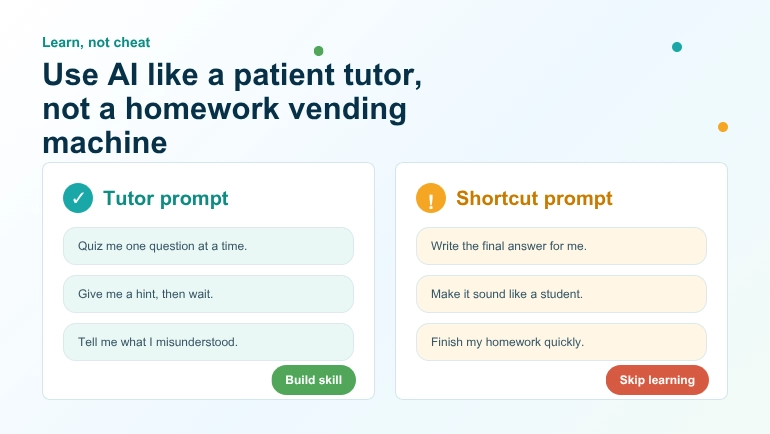
Most articles about AI and students fall into one of two camps. Either they panic about cheating, or they hand you a copy-paste answer machine and call it "productivity." Neither is useful if you're actually trying to learn something. Used well, an AI chatbot is closer to a very patient tutor who never gets tired of your questions than it is to a vending machine for finished homework — and the difference between those two outcomes almost always comes down to how you word the prompt.
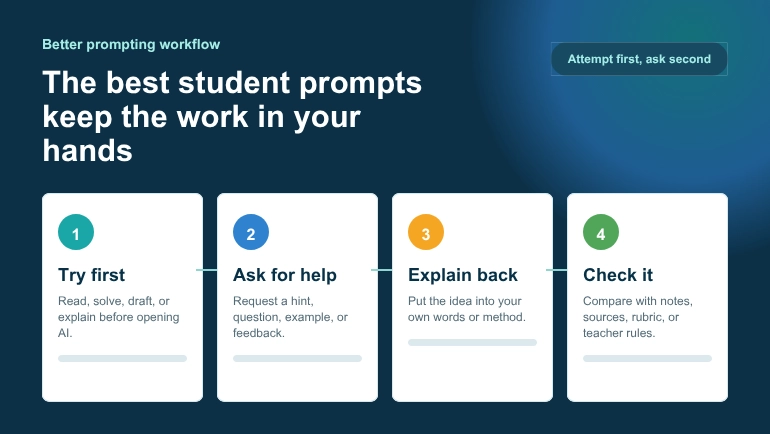
Ask an AI to "write my essay on the causes of World War I" and you'll get a generic essay you didn't learn anything from, that your teacher can usually spot anyway, and that you can't defend if asked a single follow-up question in class. Ask it to "quiz me on the causes of World War I until I can explain each one without notes," and you get something closer to a study session with a tutor who has read the entire textbook.
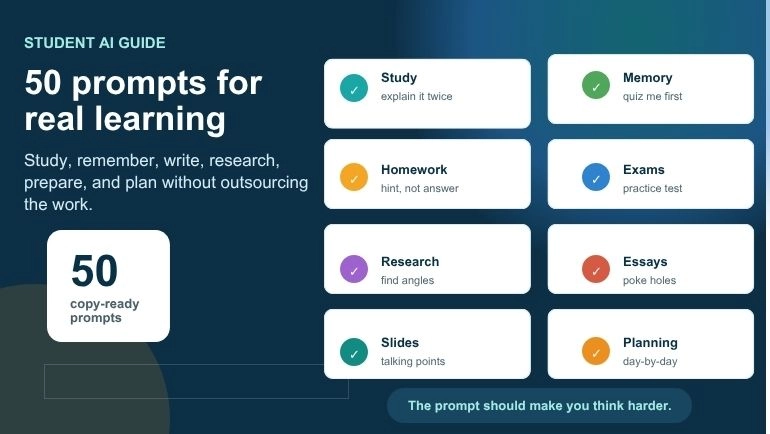
This guide collects 50 AI prompts for students that are built around the second approach. They're grouped by the actual tasks you deal with during a school term — studying new material, remembering it, getting unstuck on homework, preparing for exams, researching a topic properly, writing essays, building presentations, and managing your time — because that's how studying actually happens, not as one big undifferentiated blob called "using AI for school."
Every prompt is written so you can copy it directly into ChatGPT, Claude, Gemini, or whichever assistant your school allows, swapping in your own topic. We've also pointed to a few free ClassTools24 tools along the way where a dedicated tool will genuinely get you a better result faster than typing a prompt — there's no point prompting an AI to count your words when a proper Word Counter does it instantly and for free.
Why "learn, not cheat" isn't just a slogan
Before the prompt list, it's worth being honest about what actually happens when a student submits AI-written work as their own. It isn't just a rules problem — it's a learning problem. Skills like argument-building, source evaluation, and clear explanation are things you get better at by doing them badly a few times first. Outsourcing that struggle to a chatbot doesn't just risk a zero on an assignment; it quietly removes the exact repetitions your brain needs to get good at the skill the assignment was designed to build.
The research on how people actually learn backs this up. Cognitive scientists have shown for decades that the effort of retrieving information from memory — rather than just re-reading it or having it handed to you — is what makes it stick. This is often called the "testing effect" or retrieval practice, and it's one of the most well-replicated findings in learning science; the research group at Retrieval Practice, led by cognitive scientist Dr. Pooja Agarwal, has a good plain-language summary of the evidence if you want to see why "quiz me" prompts show up so often below.
That's also the spirit behind UNESCO's own guidance on generative AI in education: AI can be a genuine support for learning, but only when it's used to develop understanding and critical thinking rather than to replace the thinking itself. Every prompt in this guide is written to sit on the right side of that line — asking the AI to explain, quiz, challenge, organize, or give feedback, never to simply produce the finished, submittable answer.
One more practical note: if your school or course allows AI assistance but requires you to disclose it, keep a copy of the prompts you used. APA's guidance on citing AI-generated content is a useful reference for exactly how to do that if a citation is required.
How to use this list
You don't need all 50 prompts for one assignment. Pick the two or three that match what you're actually stuck on right now — understanding a concept, remembering it, starting a first draft, finding sources, or just figuring out when to fit it all in. Swap the bracketed placeholders for your real topic, and treat the AI's reply as a starting point to push back on, not a final answer to hand in.
📚 Study & Learning Prompts
These prompts are for the moment you sit down with new material and think "I don't actually get this yet." The goal is understanding, not a summary you'll forget by tomorrow.
- "Explain [topic] to me like I'm learning it for the first time, then explain it again assuming I already understand the basics but I'm confused about [specific part]."
- "I just read this paragraph about [topic]. Ask me three questions to check if I actually understood it, one at a time, and tell me honestly if my answers are wrong."
- "Break [topic] down into the 4-5 smaller ideas I need to understand before the whole thing makes sense, in the order I should learn them."
- "Give me a real-world example of [concept] that has nothing to do with the textbook example, so I can check if I understand the idea or just memorized the example."
- "What's a common misunderstanding students have about [topic], and how would I know if I have that same misunderstanding?"
- "Compare [concept A] and [concept B] in a table — what's actually different, and why do students usually mix them up?"
- "I'm going to explain [topic] back to you in my own words. Don't correct me until I'm done, then tell me what I got right, what I got wrong, and what I missed."
If a chapter or article is genuinely long and you're short on time before you can even start studying it, running it through Student Ai Summarizer first gives you a clean overview to build these prompts around — just don't let the summary replace actually reading the source when the assignment depends on it.
🧠 Memory & Active Recall Prompts
Reading your notes over and over feels productive but is one of the least effective ways to make information stick. These prompts force retrieval — the thing that actually builds memory.
- "Quiz me on [topic] with one question at a time. Don't show me the next question until I answer the current one, and tell me if I'm wrong before moving on."
- "Make 10 flashcard-style question-and-answer pairs from these notes: [paste notes]."
- "Give me a mnemonic or memory trick to remember [list of facts/terms], and explain why it works."
- "I'll try to list everything I remember about [topic] from memory first. Once I'm done, tell me what I missed."
- "Turn these vocabulary words into a matching-style quiz: [list words and definitions]."
- "Space these topics out for me: which of [topic list] should I review today, which in 3 days, and which in a week, based on spaced repetition?"
For vocabulary-heavy subjects, pulling key terms straight out of a reading with Vocabulary Extractor and turning them into a quick matching game with Match The Pairs Generator is usually faster than asking an AI to guess which words in a passage actually matter.
📝 Homework Help Prompts
The line between "getting help" and "getting it done for you" is easy to cross by accident. These prompts are built to keep you doing the actual work while getting unstuck when you genuinely are. For the fuller picture of responsible AI homework habits, see this guide to using AI for homework responsibly.
- "I'm stuck on this problem: [paste problem]. Don't give me the answer — give me a hint for the first step and wait for me to try it."
- "Here's my attempt at this problem: [paste your work]. Where did I go wrong, and why, without giving me the corrected version?"
- "I don't understand the instructions for this assignment: [paste instructions]. Rephrase what it's actually asking me to do."
- "Check my answer to this problem for reasoning errors, not just whether the final number is right: [paste your answer and reasoning]."
- "Give me a problem similar to this one but with different numbers, so I can practice the same method again: [paste original problem]."
- "I got this wrong on a past assignment: [paste question and your wrong answer]. Explain the mistake in a way that will stop me from repeating it."
🎯 Exam Preparation Prompts
Exam prep works best when it mimics the actual exam — retrieving answers under a bit of pressure, not re-reading a study guide one more time.
- "Create a 10-question practice test on [topic/unit] that matches the style of a [multiple choice / short answer / essay] exam."
- "Here's my practice test answer: [paste answer]. Grade it like a teacher would and tell me exactly what's missing for full marks."
- "What are the 5 topics within [subject/unit] that are most commonly tested, based on how this subject is usually taught?"
- "Give me a mixed practice set that combines [topic A], [topic B], and [topic C] so I can practice telling them apart under exam conditions."
- "I have [X hours] before this exam and these topics to cover: [list]. Help me prioritize which ones need the most review."
- "Ask me this exam-style question, and after I answer, tell me what a full-mark answer would include that mine didn't: [paste question]."
- "What kind of trick or trap questions come up around [topic], and how do I avoid falling for them?"
Once you've built a stack of practice questions this way, Worksheet Generator turns them into a clean, printable practice sheet — genuinely useful for a last read-through the night before, away from a screen.
📖 Research Prompts
AI is not a search engine and it will occasionally invent sources that don't exist — this is well documented and worth taking seriously. Use it to organize your thinking and your search strategy, then verify everything against real sources yourself.
- "I'm researching [topic] for a [type of assignment]. What are 5 more specific angles or sub-questions I could investigate instead of the broad topic?"
- "What are the strongest arguments on both sides of [debate/topic], so I know what to look for when I search for sources?"
- "I found this source: [paste excerpt or summary]. What kind of source is this (primary, secondary, opinion, etc.) and what should I check before trusting it?"
- "Turn my research notes into an outline organized by theme, not by which source they came from: [paste notes]."
- "What key terms or search phrases should I use to find academic sources on [topic], beyond the obvious ones?"
- "Here are two sources that seem to disagree about [topic]: [summarize both]. What's the actual disagreement, and what would I need to find out to judge between them?"
Because AI-suggested "sources" can be wrong or entirely made up, always confirm anything an AI gives you against a real database or your school library. For citation formatting once you've found real sources, Purdue's OWL research and citation guide is the standard reference most teachers expect you to follow.
✍️ Essay & Writing Support Prompts
The most common way students get caught using AI on essays isn't clumsy writing — it's an essay that doesn't sound like anything they'd actually say, on an argument they can't explain out loud. These prompts use AI as an editor and thinking partner instead of a ghostwriter.
- "I have this thesis: [paste thesis]. Poke holes in it — what's the strongest counterargument, and is my thesis specific enough?"
- "Here's my essay outline: [paste outline]. Does the argument actually flow logically from one point to the next, or are there gaps?"
- "I wrote this paragraph: [paste paragraph]. Don't rewrite it — tell me specifically what's unclear or unconvincing about it."
- "Give me 3 possible thesis statements for an essay about [topic], each taking a different angle, so I can pick the one I actually want to argue."
- "Check this paragraph for run-on sentences and unclear pronoun references, and explain each one instead of just fixing it: [paste paragraph]."
- "I'm stuck on how to start my essay about [topic]. Give me 3 different opening-line approaches (a question, a fact, a scenario) that I can develop myself."
Before you submit, run your draft through Word Counter to check it actually meets the length requirement, and Reading Time Calculator if you're prepping something you'll also read aloud, like a speech.
🎤 Presentation Prompts
A slide deck an AI wrote top to bottom is usually easy to spot — generic bullet points, no real voice, and a presenter who freezes the moment someone asks a question that isn't on the slide. Use AI to shape structure and delivery instead.
- "I'm presenting on [topic] for [X minutes]. Suggest a structure with rough timing for each section, not the actual content."
- "Here's my presentation outline: [paste outline]. What's missing that an audience would expect to see?"
- "Give me 3 questions an audience member might realistically ask after this presentation on [topic], so I can prepare answers."
- "I have too much information for one slide: [paste content]. Help me decide what's essential versus what belongs in my speaker notes instead."
- "Turn these bullet points into talking points I can say naturally, not read word-for-word: [paste bullets]."
- "Critique my presentation opening line for grabbing attention without sounding gimmicky: [paste opening line]."
Once your structure is solid, Presentation Slides Generator handles the actual slide layout, and Timeline or Venn Diagram Generator are worth using directly for any slide comparing options or showing a sequence of events — a real diagram reads better on a slide than an AI's attempt to describe one in text.
⏰ Time Management & Study Planning Prompts
AI is genuinely good at this category, because a schedule doesn't require original thought — it requires someone patient enough to actually do the arithmetic on your available hours.
- "I have these assignments due: [list with dates]. Help me build a day-by-day plan for the next [X days] that doesn't leave everything until the last two days."
- "I study best in [morning/evening] and get distracted after about [X minutes]. Suggest a study session structure that works with that, not against it."
- "I have [X hours] free this week to study for [subjects]. How should I split the time based on which subject needs the most work?"
- "I keep procrastinating on [specific task]. Ask me questions to figure out why, instead of just telling me to 'just start.'"
- "Turn this messy to-do list into a prioritized order based on deadlines and how long each task will actually take: [paste list]."
- "I missed my study plan for [reason]. Help me adjust the rest of the week's plan realistically instead of just cramming everything back in."
Once you've got a plan you're happy with, Study Planner Generator turns it into an actual weekly schedule you can print or keep open on your phone, and Classroom Timer is a simple way to run focused, timed study blocks without relying on a phone timer that also has every other app one tap away.
The line that matters
Every prompt above shares one thing in common: the AI is doing less of the thinking than you are. It's explaining, questioning, checking, and organizing — not producing the finished product you'll put your name on. That's a small shift in wording, but it's the entire difference between using AI as a study tool and using it as a shortcut around actually learning the material.
If you're ever unsure whether a particular use of AI crosses a line, a fair test is this: could you explain, out loud, without looking at anything, what you just submitted and why you wrote it that way? If the honest answer is no, that's worth fixing before you hand the work in — not because you'll get caught, but because the point of the assignment was never the assignment. It was whatever skill doing the assignment was supposed to build in you.
Use AI to get unstuck, to check your understanding, and to practice retrieving what you've learned. Use ClassTools24's own tools — Student Ai Summarizer, Study Planner Generator, Worksheet Generator, and the rest — for the parts of studying that are genuinely mechanical. And save your own thinking for the parts no tool, AI or otherwise, can do for you.