A practical guide for students, teachers, and parents
A student opens a homework task, reads the first question, and realizes they do not know how to begin. An AI assistant can produce an answer within seconds, but copying that answer would not help the student understand the lesson. It may also break the teacher's rules, include incorrect information, or produce writing that the student cannot explain.
This is the central problem with AI and homework. The technology can be useful for explanations, planning, revision, and feedback, but it can also make it easy to skip the thinking that homework is meant to develop. Responsible use begins by deciding what part of the task must remain the student's own work.
This guide is for students who want useful support without cheating, teachers who need practical classroom boundaries, and parents who want to help children make sensible choices. It explains how to check assignment rules, ask better questions, verify information, protect privacy, document AI support, and turn suggestions into genuine learning.
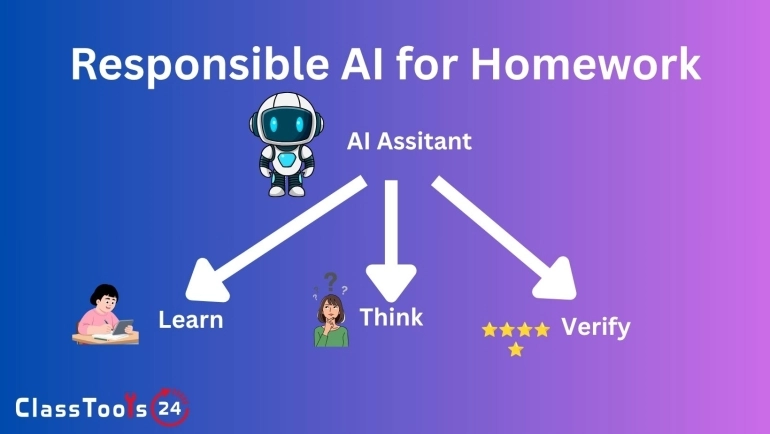
The goal is not to treat every use of AI as dishonest or every generated answer as trustworthy. The better approach is to use it as a limited study assistant. A calculator can check arithmetic without replacing mathematical understanding. A dictionary can explain vocabulary without writing an essay. AI should be handled with the same care: use it for an appropriate purpose, understand its limits, and remain responsible for the final work. UNESCO's guidance for generative AI in education takes a similar position, calling for AI to be used in a way that keeps students, not the tool, responsible for the final understanding and output.
Why Responsible AI Use Matters
AI tools are becoming part of study routines, writing applications, search systems, coding environments, and learning platforms. Students will encounter them even when a school does not formally teach AI skills. Simply banning discussion of the technology can leave students unsure about what counts as acceptable help.
Homework usually serves a specific learning purpose. A mathematics problem may test whether a student can choose and apply a method. An essay may assess reasoning, evidence, organization, and written communication. A programming task may test whether a beginner understands variables, conditions, or functions. If AI completes the assessed thinking, the submitted work no longer gives the teacher an accurate picture of the student's learning.
Responsible use also matters because AI output can sound confident while being wrong. It may invent sources, misunderstand instructions, miss exceptions, produce outdated information, or solve a problem using a method the class has not studied. Students need to check every important claim instead of assuming that polished writing is accurate.
Privacy is another concern. Homework can contain student names, school details, grades, teacher comments, account information, personal experiences, unpublished research, or photographs. Pasting that material into an external service may expose information that should remain private. A responsible workflow removes identifying details and follows school rules about approved platforms.
What You Need Before You Start
- The assignment instructions: Read the complete task, marking criteria, required sources, word limit, and submission rules.
- Your school or teacher's AI policy: Check whether AI is allowed for planning, explanations, proofreading, coding help, translation, or another part of the task.
- Your own first attempt: Write notes, identify difficult parts, or try the problem before asking for help.
- Reliable class resources: Keep textbooks, lesson notes, teacher examples, approved websites, and source materials available for verification.
- A checking method: Be prepared to verify calculations, quotations, dates, references, definitions, and factual claims.
- A record of assistance: Save prompts or short notes explaining how AI was used if disclosure is required.
- Privacy awareness: Remove names, login details, grades, private feedback, school records, and other sensitive information.
Step-by-Step Guide
Step 1: Identify the Learning Goal
Before opening an AI tool, ask what the homework is supposed to teach or assess. If the task is to practise writing a persuasive paragraph, asking AI to write the paragraph removes the practice. Asking it to explain the difference between a claim and supporting evidence may be appropriate because the student still creates the final paragraph.
Write the learning goal in one sentence. For example: “I need to learn how to compare two historical sources,” or “I need to practise solving simultaneous equations.” This sentence makes it easier to recognize requests that support learning and requests that replace it.
Step 2: Check the Teacher's Rules
AI rules can differ between classes and assignments. A teacher may allow brainstorming but not generated sentences. Another may permit grammar feedback if the original draft is saved. A coding teacher may allow explanations of errors but require students to write the final code independently.
If the instructions are unclear, ask the teacher before submission. A short question such as “May I use AI to suggest revision questions if I write all answers myself?” is better than guessing. Do not assume that using AI is acceptable because classmates are doing it.
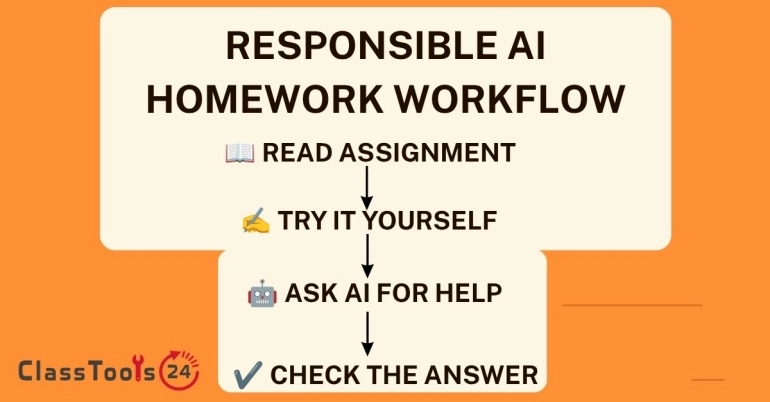
Step 3: Make an Independent First Attempt
Start by reading the task and writing what you already know. For an essay, create a rough thesis and list possible evidence. For mathematics, write the formula or first step. For science, identify the variables and relevant concept. For coding, reproduce the error and describe what the program should do.
This first attempt protects the student's voice and reveals the exact point of difficulty. It also leads to better prompts. “Explain photosynthesis” is broad. “I understand that plants use light, but I do not understand where carbon dioxide is used” identifies a real learning gap.
Step 4: Ask for Explanation, Not Completion
Useful prompts request teaching support rather than a finished submission. Ask for a simpler explanation, an analogy, a worked example using different numbers, a short quiz, feedback on a plan, or questions that test understanding.
Examples of responsible prompts include:
- “Explain this concept at the level of a ninth-grade student.”
- “Give me three practice questions similar to this one, but do not solve my assigned question.”
- “Ask me questions that will help me improve my essay outline.”
- “Explain what this error message means without rewriting the entire program.”
- “Check whether my paragraph has a clear claim and evidence. Do not replace my sentences.”
Avoid prompts such as “Complete my worksheet,” “Write my final essay,” or “Make this answer impossible for my teacher to detect.” Those requests focus on avoiding learning and misrepresenting authorship.
Step 5: Break Large Tasks Into Smaller Questions
AI responses become more useful when the student works on one learning problem at a time. Instead of asking for a complete book report, ask how to identify a theme, choose evidence, and explain the connection between a quotation and a claim.
After each explanation, close the response or look away and write the idea in your own words. If you cannot explain it without rereading the generated answer, you probably do not understand it yet. Ask for another example or return to class notes.
Step 6: Verify Important Information
Never treat generated text as a source by itself. Compare factual claims with textbooks, teacher materials, library resources, official websites, or sources required by the assignment. Open every cited source and confirm that it exists and supports the stated claim.
For mathematics, redo the calculation and check each step. For code, run the program and test normal, empty, incorrect, and boundary inputs. For writing, check names, dates, quotations, and terminology. Verification is part of the work, not an optional final glance.
Step 7: Create the Final Work Yourself
Use your notes and understanding to write the final response. Do not merely replace a few words in generated text. Sentence swapping can preserve borrowed reasoning while making the writing less clear.
A practical method is to close the AI response, wait a few minutes, and write from your own outline. Then compare your draft with the assignment criteria. The final work should contain language and reasoning you can explain to the teacher.
Use the Word Counter to check length after the ideas are complete. Word count should guide revision, not encourage padding. Remove repetition, clarify vague sentences, and make sure each paragraph contributes to the answer.
Step 8: Disclose AI Assistance When Required
Some teachers require a statement describing how AI was used. Keep it factual and specific. For example: “I used an AI assistant to generate three revision questions and explain the difference between correlation and causation. I checked the explanation against our textbook and wrote the final response independently.”
Do not claim that no AI was used if it influenced the work. Honest disclosure gives the teacher useful context and demonstrates responsible judgment. If a formal citation style is required, follow the teacher's instructions because citation guidance for AI can vary.
Step 9: Perform an Understanding Check
Before submitting, answer these questions without AI:
- Can I explain the main idea in my own words?
- Can I show how I reached the answer?
- Can I identify and explain my sources?
- Can I defend the choices in my writing or code?
- Would I be comfortable showing my prompts to my teacher?
If the answer to any question is no, return to the material and revise. A polished submission is not useful if the student cannot discuss it afterward.
Real Classroom Examples
Example 1: Planning a History Essay
Situation: A student must compare the causes of two historical events.
Problem: The student has notes but cannot organize them into a clear comparison.
Responsible solution: The student creates an initial list of causes, then asks AI to provide questions that reveal similarities and differences. The student checks each idea against class sources and writes the outline and essay independently.
Result: AI supports organization without writing the assessed argument. The student can explain why each piece of evidence was selected.
Example 2: Understanding a Mathematics Method
Situation: A student is stuck on a quadratic equation.
Problem: Copying a final answer would not teach the method and may use steps different from those taught in class.
Responsible solution: The student asks for a worked example using different numbers. After studying it, the student returns to the assigned equation and solves it independently.
Result: The student practises the required skill and can show the working process to the teacher.
Example 3: Debugging Beginner Code
Situation: A beginner's program repeats forever.
Problem: Asking AI to rewrite the program could hide the reason for the error.
Responsible solution: The student shares a small, non-sensitive code sample and asks what conditions normally cause an infinite loop. The student adds temporary output statements, finds the unchanged counter, and makes the correction.
Result: The program works, and the student learns a debugging method that can be reused.
Example 4: Revising a Science Explanation
Situation: A student writes an explanation of evaporation but is unsure whether it is clear.
Problem: Replacing the paragraph with generated text would remove the student's voice.
Responsible solution: The student asks for feedback on missing concepts and unclear transitions. The student checks the suggestions against the textbook and revises the original paragraph.
Result: The final writing remains the student's work but communicates the science more accurately.
Benefits of Responsible AI Support
Better Understanding
Students can request explanations at an appropriate level, ask follow-up questions, and practise with new examples. This is helpful when class notes feel too brief or a textbook explanation is difficult to follow.
Faster Feedback
AI can point out unclear sections in an outline, suggest questions for revision, or identify possible test cases for code. The student still decides which feedback is correct and useful.
More Productive Study Sessions
Students can generate flashcard questions, practice quizzes, or revision schedules. A QR Code Generator can help teachers or study groups share approved revision resources without typing long links.
Improved Self-Questioning
Good AI use teaches students to ask precise questions. Identifying what is confusing is itself a valuable learning skill. Clear questions also make conversations with teachers more productive.
Support for Different Learning Needs
A difficult explanation can be restated with simpler vocabulary, an analogy, or a step sequence. Students should still compare the explanation with approved learning materials.
Common Mistakes and How to Avoid Them
Copying the First Response
Generated answers may be inaccurate or inappropriate for the assignment. Use the response as a starting point for checking and learning, never as automatic final work.
Using AI Before Reading the Task
This often produces an answer that misses the teacher's requirements. Read the task, identify the learning goal, and attempt it first.
Trusting Invented References
AI may provide books, articles, quotations, or links that do not exist. Open every source and confirm the relevant information yourself.
Uploading Private Material
Do not paste student records, names, grades, private teacher comments, login details, photographs, or school documents into an unapproved tool. The Image to Text tool can help extract text from non-sensitive study images, but the source should always be reviewed for private information first.
Changing Words Without Understanding
Replacing vocabulary in generated text does not make the reasoning original. Write from your own notes and be prepared to explain every claim.
Ignoring the Required Method
A correct result can still be unsuitable if it uses a method outside the course. Follow the method, notation, and source requirements given by the teacher.
Using AI to Avoid Asking for Help
Teachers need to know when a class is struggling. AI should not replace conversations about confusing instructions, learning difficulties, or feedback.
Tips From Teachers
- Define acceptable AI use for each assignment instead of relying on one vague rule.
- Ask students to submit outlines, drafts, calculations, source notes, or version history when the process matters.
- Design short discussions where students explain how they reached an answer.
- Use fictional or non-sensitive examples when demonstrating prompts.
- Show students an inaccurate generated response and practise checking it together.
- Distinguish between support, such as explanation or feedback, and substitution, where AI performs the assessed skill.
- Give students a simple disclosure format so honesty does not feel complicated.
- Discuss what students should do when an AI response conflicts with a textbook or teacher example.
Tips for Students
- Complete a ten-minute independent attempt before requesting AI help.
- Keep a short list of questions rather than requesting the whole assignment.
- Use AI for practice questions, then answer without looking at generated solutions.
- Write final paragraphs in your normal voice and vocabulary.
- Check important facts with at least one reliable source.
- Use the Word Counter during final editing, not as a substitute for planning.
- Save enough time to verify the output instead of using AI immediately before the deadline.
- Ask the teacher whenever the assignment policy is unclear.
- Never use AI to disguise copied work or avoid an academic honesty check.
Helpful Free ClassTools24 Tools
Word Counter: Check whether an essay, reflection, or report meets the required length. It is most useful after the main ideas have been written.
Image to Text: Extract text from a non-sensitive worksheet image or personal study note. Review the extracted text carefully because OCR can confuse letters, numbers, and punctuation.
QR Code Generator: Teachers and study groups can share approved resources, revision pages, forms, and reading links through a scannable code.
Image Compressor: Reduce the size of non-sensitive screenshots or project images before adding them to a homework submission.
Text to Slug: Beginner developers can create readable URL slugs for school website projects after finalizing a page title.
Comparison of Homework Approaches
| Method | Advantages | Risks | Best Use |
|---|---|---|---|
| Independent work only | Shows the student's current understanding clearly. | A student may remain stuck without useful support. | Initial attempts, assessments, and skills the teacher requires independently. |
| AI writes the final answer | Produces fast, polished-looking text. | Can be inaccurate, dishonest, generic, and difficult for the student to explain. | Not appropriate for assessed homework unless the teacher explicitly designs the task around analysis of generated output. |
| AI explains a concept | Provides another explanation and allows follow-up questions. | The explanation may still contain errors. | Understanding difficult concepts before returning to the assignment. |
| AI creates practice questions | Supports revision without completing the assigned task. | Questions may not match the course level. | Self-testing after checking the topic and difficulty. |
| AI reviews a student draft | Can identify unclear areas and possible omissions. | Students may accept unnecessary rewrites. | Feedback when the student keeps control of final wording. |
| Teacher or peer feedback | Reflects classroom expectations and shared context. | May not be immediately available. | Clarifying instructions, checking understanding, and improving assessed work. |
Frequently Asked Questions
Is using AI for homework always cheating?
No. It depends on the assignment rules and how the tool is used. Asking for an explanation may be allowed, while submitting generated work as your own may be cheating.
Should I tell my teacher that I used AI?
Follow the teacher's disclosure policy. When disclosure is required, explain specifically what assistance you received and what work you completed independently.
Can AI check my grammar?
It may be allowed for some assignments, but check first. Review every suggestion and keep your original meaning and voice.
Can I use AI to create an essay outline?
Only when the teacher permits it. Begin with your own ideas and use questions or feedback to improve the outline rather than accepting a complete generated argument.
How do I know whether an AI answer is correct?
Compare it with textbooks, class notes, official resources, calculations, experiments, or verified sources. Do not rely on confidence or writing quality.
Can AI provide sources for homework?
It can suggest search directions, but references may be invented or inaccurate. Locate, open, read, and verify every source before citing it.
Is it safe to upload my worksheet?
Not automatically. A worksheet may contain names, grades, school details, teacher feedback, or account information. Use only approved systems and remove private details.
Can AI help with mathematics homework?
Yes, when permitted. Ask for explanations or examples using different numbers, then solve the assigned problem and show your own working.
Can beginner programmers use AI for debugging?
Yes, if the course allows it. Ask about the error and debugging method rather than requesting a complete replacement program.
What should I do if the teacher has not provided an AI rule?
Ask before using it on assessed work. Until the rule is clear, rely on class materials and ordinary teacher-approved study support.
How can parents support responsible use?
Ask children to explain what they learned, show their first attempt, identify any AI assistance, and verify important information together.
What is the best test before submitting AI-assisted homework?
Close the AI tool and explain the answer independently. If you cannot explain the reasoning, sources, or method, the work needs more revision.
Final Thoughts
Responsible AI use keeps learning at the center of homework. The student reads the task, attempts the work, asks focused questions, checks the response, protects private information, and creates the final submission independently.
AI is most useful when it helps a student understand something they could not understand before. It becomes harmful when it hides confusion, replaces assessed thinking, or encourages a student to submit work they cannot explain.
Start with one practical habit: before using AI, write down what you already know and the exact point where you are stuck. That small step produces better questions, protects original thinking, and makes the technology serve the learning goal rather than control it. For a broader look at where AI helps versus where it becomes a shortcut in the classroom, see AI in classrooms: teaching assistant or shortcut?.