Minify JavaScript code instantly to reduce file size and improve website performance.
Introduction
JavaScript makes websites interactive, but large JavaScript files can slow down a page very quickly. A student may build a project with buttons, menus, forms, sliders, or small games, and the code may grow longer than expected. A teacher reviewing student websites may notice that pages feel slow because the JavaScript includes unnecessary spaces, comments, and line breaks. Developers also face this problem when preparing websites for real users, where speed and performance matter.
Readable JavaScript is useful during development because spacing, comments, and line breaks help users understand the code. However, when a website is ready to publish, the browser does not need those extra characters. They increase file size and can make scripts take longer to download, especially on mobile networks or slower connections.
This JavaScript Minifier solves that problem by compressing JavaScript code into a smaller and more optimized format. You paste your code, click the minify or reduce button, and get compact JavaScript that is ready for production use. It is fast, free, browser-based, and helpful for students, teachers, and developers who want cleaner performance without complex setup.
What This Tool Does
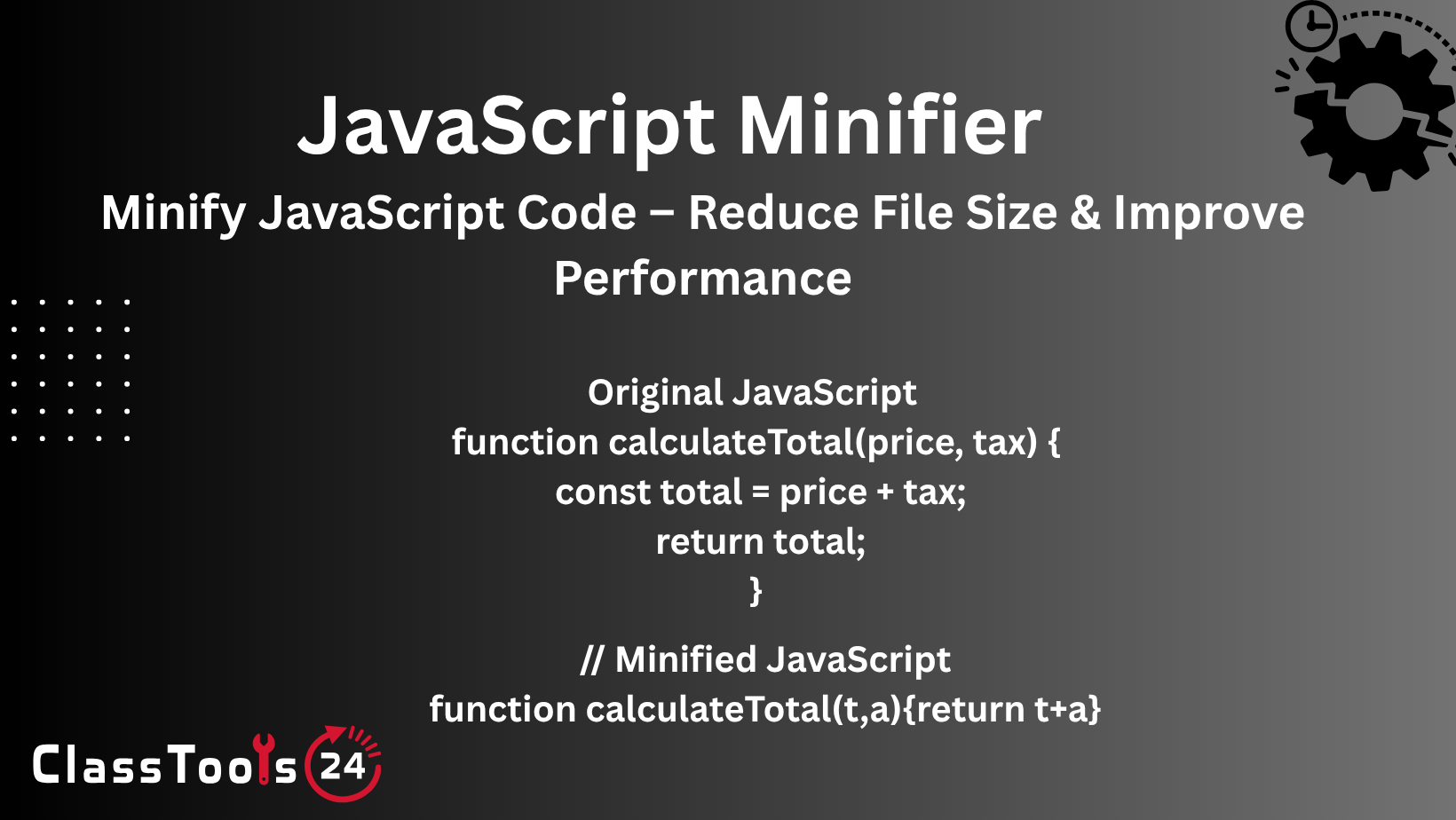
This tool reduces JavaScript file size by removing unnecessary spaces, comments, and line breaks while keeping the code functionality intact. The minified result is harder for humans to read, but easier and faster for browsers to download and execute in live website environments.
The process is simple. You paste your JavaScript into the input box and click the Reduce button. The tool processes the code in seconds and returns a compressed version. It also shows the size information, helping users understand how much the code has been reduced after minification.
This is useful for both learning and production workflows. Students can compare original and minified code to understand optimization. Teachers can use it to explain performance improvement. Developers can use it before deploying scripts to live websites.
The tool works directly in the browser and does not require signup or installation. It is designed for quick use, so users can optimize scripts without opening heavy development tools or installing extra packages.
Why JavaScript Minification Matters
JavaScript minification matters because script size affects website loading speed. When a browser opens a page, it downloads JavaScript files along with HTML, CSS, images, and other resources. If the JavaScript file is too large, the page may load slowly or respond late to user actions.
By reducing file size, minification helps scripts load faster. This improves user experience, especially on mobile devices. A faster website feels smoother, more professional, and easier to use. For students, it improves project quality. For developers, it is a normal part of preparing production-ready code.
Minification also reduces bandwidth usage. Smaller files require less data transfer, which can help websites serve users more efficiently. This matters for high-traffic websites and users with slower internet connections.
Another benefit is cleaner deployment. Developers often keep readable JavaScript for editing and use minified JavaScript for live websites. This gives the best balance between development readability and production performance.
Why Size Reduction Visibility Matters
Seeing how much size is reduced makes the minification process more meaningful. Without size feedback, users may not know whether the optimization made a real difference. A tool that shows file size before and after minification helps users understand the value of compression clearly.
For students, this becomes a practical learning experience. They can paste a script, minify it, and immediately see the byte reduction. This helps them understand how spaces, comments, and formatting affect file size. For teachers, it creates a simple classroom demonstration for website performance.
For developers, size visibility helps with decision-making. If a script is reduced significantly, it confirms that minification is useful before deployment. If the reduction is small, the developer may look for other performance improvements such as removing unused code or splitting scripts.
This feedback makes the tool more than a simple compressor. It helps users learn, compare, and optimize with confidence.
Minified Code vs Readable Code
Readable JavaScript and minified JavaScript both have different purposes. Readable code is best during development because it includes indentation, line breaks, and comments. It helps users understand logic, debug errors, and collaborate with others.
Minified code is best for production because it removes unnecessary characters and reduces file size. It is not meant for easy editing, but it is better for performance. A website should usually keep readable code for development and use minified code when publishing.
This tool helps users switch from development-ready code to production-ready code quickly. After writing and testing JavaScript in readable form, users can paste it into the minifier and generate an optimized version for deployment.
If users need to read compressed code again, they can use JavaScript Beautifier to format it back into a more readable structure. This creates a complete workflow for writing, optimizing, and reviewing JavaScript code.
Use Cases
1. Student web development projects:
Situation: A student builds a website with interactive buttons, forms, or menus.
Problem: The JavaScript file becomes large because it includes extra spaces, comments, and formatting.
Solution: The student minifies the JavaScript using this tool before submitting or publishing the project.
Result: The project loads faster and shows better understanding of web optimization.
2. Teacher performance demonstration:
Situation: A teacher wants to explain how code size affects website speed.
Problem: Students may not understand why optimization matters if they only see theory.
Solution: The teacher pastes JavaScript into the tool and shows the reduced output size.
Result: Students clearly understand how minification improves performance.
3. Preparing production scripts:
Situation: A developer finishes writing JavaScript for a website.
Problem: The code is readable but not optimized for live use.
Solution: The developer minifies the script before deployment.
Result: The website uses smaller JavaScript files and performs more efficiently.
4. Mobile website optimization:
Situation: A website receives many visitors from mobile devices.
Problem: Large JavaScript files load slowly on slower connections.
Solution: The scripts are minified to reduce file size.
Result: Mobile users experience faster loading and smoother interaction.
5. Reducing bandwidth usage:
Situation: A website has repeated traffic and multiple script files.
Problem: Larger files consume more bandwidth over time.
Solution: JavaScript files are minified before upload.
Result: The website becomes lighter and more efficient for users and hosting resources.
6. Cleaning final project files:
Situation: A student or developer wants to prepare final code for delivery.
Problem: Development code contains comments and extra formatting not needed in the final version.
Solution: The code is passed through this minifier.
Result: The final script is compact, optimized, and ready for use.
Real-World Example
Imagine a student creating a classroom project website with a quiz, dropdown menu, and interactive buttons. The JavaScript works correctly, but the file includes many comments, blank lines, and extra spacing from testing. When the project is opened on a mobile device, the page feels slightly slow.
The student uses this JavaScript Minifier and pastes the full script into the tool. After clicking Reduce, the tool generates a smaller version of the code and shows the size reduction. The student replaces the old script with the minified version in the final project folder.
The website now loads faster and feels more polished. The student also learns an important professional habit: readable code is useful while building, but optimized code is better for publishing. A teacher can use the same example to explain real-world development workflows in a simple and practical way.
Summary
The JavaScript Minifier is a practical tool for reducing script size and improving website performance. It removes unnecessary formatting while keeping the code behavior the same, making it useful for live websites, school projects, and development workflows.
For students, it teaches optimization through hands-on practice. For teachers, it supports lessons about performance and production-ready code. For developers, it provides a quick way to prepare scripts for faster loading and better user experience.
The tool works well with related utilities. You can use JavaScript Beautifier when you need readable code again, CSS Minifier for stylesheet optimization, and HTML Minifier for reducing page markup. Together, these tools help create a complete website optimization workflow.
How This Tool Compares to Other Tools
Many JavaScript minifiers are designed mainly for advanced developers and may feel complicated for beginners. ClassTools24 keeps the workflow simple while still providing useful optimization features.
| Feature | ClassTools24 | Typical Tools |
|---|---|---|
| Free to Use | 100% free for JavaScript minification. | May include limits or paid features. |
| No Signup | Works instantly without account. | Some require login. |
| Speed | Minifies JavaScript in seconds. | May include extra steps. |
| Ease of Use | Simple paste and reduce workflow. | Can be complex for beginners. |
| Size Reduction | Shows optimized output and file size information. | May not show clear reduction details. |
| Performance Focus | Helps reduce file size for faster websites. | May focus only on code output. |
| Education Focus | Useful for students, teachers, and learning optimization. | Usually developer-only focus. |
| Related Workflow | Pairs with JavaScript Beautifier, CSS Minifier, and HTML Minifier. | May not connect with related tools. |
FAQs
What is JavaScript minification?
JavaScript minification removes unnecessary spaces, comments, and line breaks to reduce file size.
Does minification change how my script works?
No. The goal is to keep the same functionality while making the code smaller.
Can students use this tool?
Yes. It is useful for web development assignments, coding lessons, and performance practice.
Can I see size reduction?
Yes. The tool helps users understand the size impact after reducing the code.
Can I make minified JavaScript readable again?
Yes. You can use JavaScript Beautifier to format compressed JavaScript into readable code.
Do I need to sign up?
No. The tool works instantly in your browser with no signup required.


