Plan fair, practical classroom seating without starting from a blank page.
When Classroom Seating Becomes More Than Chairs
A teacher walks into the room on Monday morning with a new unit planned, copies ready, and a lesson that depends on students being able to talk, listen, write, and move between tasks. Then the first ten minutes disappear because three friends sit together and begin side conversations, one student cannot see the board clearly, another needs to be near the teacher for quiet support, and a new student is left choosing a seat while everyone watches.
This is the kind of classroom problem that looks small from outside the room. It is only a seating plan. But teachers know seating can affect attention, confidence, peer behavior, noise level, access to materials, and how quickly a lesson begins. A seating plan does not teach the lesson for you, but it can make the first few minutes calmer and give students a better chance to participate.
The difficult part is that seating is rarely about putting names into boxes. Teachers often need to balance friendships, learning needs, vision or hearing needs, group work, behavior patterns, classroom layout, and school routines. A student who works beautifully beside one classmate may lose focus beside another. A quiet student may need a seat where the teacher can notice when help is needed. A student who struggles with transitions may do better near the front, away from traffic around the door.
A Seating Chart Generator helps teachers create and revise seating arrangements without redrawing the room every time. It is useful when a teacher needs a fair starting point, a quick adjustment, or a printable plan that can be shared with a substitute teacher. The goal is not to remove teacher judgment. The goal is to save time on the mechanical part so the teacher can focus on the classroom reasons behind the plan.
Use Case 1: Starting A New Term With Less Guesswork
Real situation: A middle school teacher begins a new term with thirty students. Some students are familiar from last year, but several are new. The teacher has a class list, a room with fixed desks, and only a small amount of information from previous teachers.
Problem: Letting students choose seats on the first day can feel friendly, but it often creates patterns that are hard to change later. Friendship groups form quickly. Some students hide at the back. Others choose seats that make it harder to see, hear, or participate. If the teacher waits too long to adjust the seating, the change may feel like a punishment instead of a normal classroom routine.
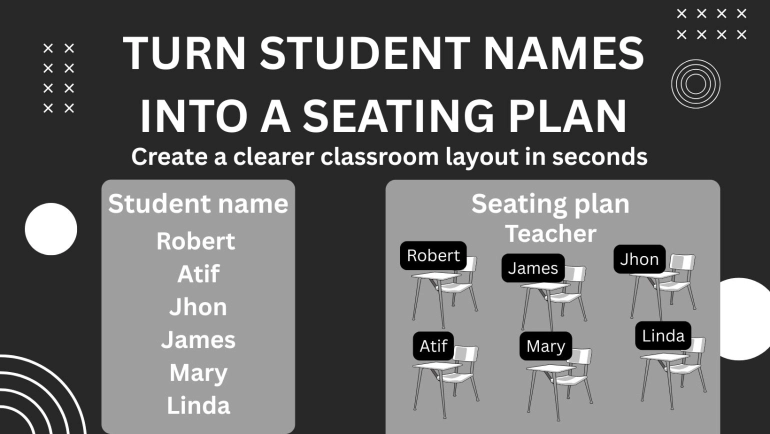
Solution: The teacher uses the seating chart generator to create an initial seating plan before students arrive. The teacher enters the student names, chooses a layout that matches the room, and reviews the arrangement. Students who need front-row access can be placed intentionally. Students who may need extra support can be kept within easy teacher reach. The chart can be printed or saved for reference.
Result: Students enter the room with a clear place to sit. The teacher starts the term with structure, not confusion. Because the seating plan is introduced as a normal classroom routine, later changes feel easier. The teacher can observe how the arrangement works during the first week and adjust based on real classroom behavior rather than guesses.
Use Case 2: Reducing Distractions During Independent Work
Real situation: A teacher notices that independent writing time is not working well. Students understand the assignment, but several keep turning around, whispering, borrowing pencils, or comparing answers before they have tried the task themselves.
Problem: The problem is not always behavior in the simple sense. Sometimes the seating plan invites distraction. Students who are close friends may find it hard to ignore each other. A student who needs quiet may be beside the loudest part of the room. A student who needs reminders may be sitting where the teacher cannot easily check in.
Solution: The teacher uses the seating chart generator to create a revised arrangement for writing days. The teacher separates students who distract each other, places students who need encouragement where quick check-ins are possible, and leaves a few supportive peer pairings in place. The chart gives the teacher a clear version to test for a week.
Result: Independent work becomes calmer. Students spend less time negotiating social space and more time writing. The teacher can move around the room with a better path for checking work. The seating plan does not replace classroom expectations, but it supports those expectations in a practical way.
Use Case 3: Planning Group Work Without Losing Control Of The Room
Real situation: A science teacher wants students to complete a lab activity in groups of four. The activity requires sharing materials, recording observations, and discussing answers. The teacher knows that random groups can be useful, but completely random seating may create groups that need too much adult support at once.
Problem: Group work depends on the right mix of students. If one group has four students who all need heavy support, the teacher cannot help everyone well. If another group has students who tend to argue, the activity can become more about conflict than learning. Manually planning groups can take too long, especially when the teacher has several classes.
Solution: The teacher uses the seating chart generator to build a layout for group tables. The teacher can start with a fair arrangement, then make small adjustments based on classroom knowledge. For some lessons, the teacher may also use a related tool such as a Random Group Generator to form groups, then place those groups into the seating chart.
Result: Students begin the lab faster because they know where to sit. Materials can be placed at the correct tables before class starts. The teacher avoids spending the first part of the lesson moving students around in front of everyone. The activity feels more organized, and students have a better chance to focus on the task.
Use Case 4: Supporting Students With Access Needs
Real situation: A student has difficulty seeing small text on the board. Another student needs fewer distractions near the door. A third student works better when seated near a peer who models calm routines. These needs may not be visible to classmates, and the teacher wants to support students without drawing attention.
Problem: Seating decisions can involve privacy and dignity. A teacher may need to place students carefully without announcing why. If the seating plan is changed casually in front of the class, students may feel singled out. If the teacher keeps the plan only in memory, it becomes harder to explain to a substitute teacher or support staff.
Solution: The teacher creates a seating chart that quietly accounts for access needs. The chart can show names and desk positions without including private notes. Sensitive information stays in the teacher planning system, not on the public seating chart. The teacher can keep one version for classroom use and a more detailed private note elsewhere if the school process allows it.
Result: Students receive support without being put on display. The teacher has a clear seating plan for daily use. If a substitute teacher covers the class, the room can still run with less confusion. The seating chart becomes a practical classroom document, not a place for private student information.
Use Case 5: Preparing For A Substitute Teacher
Real situation: A teacher is absent for professional training or illness. The lesson plan is ready, but the substitute teacher does not know the students, the classroom layout, or which seating choices help the room stay calm.
Problem: Substitute teachers often lose time asking students where they sit. Some students may honestly forget. Others may take advantage of the uncertainty. A missing seating chart can turn the first five minutes into a negotiation, especially in classes where routines matter.
Solution: The teacher prints or saves a seating chart generated from the current class layout. The chart includes student names and desk positions. If needed, the teacher can add a short neutral note outside the public chart, such as “please follow the seating plan for attendance and group work.” The seating chart can be placed with the lesson plan, attendance instructions, and emergency procedures.
Result: The substitute teacher begins class with a clearer map of the room. Attendance is easier. Students are less likely to argue about where they should sit. The teacher returns to fewer notes about confusion and more useful feedback about the actual lesson.
Use Case 6: Changing Seats Without Making It Personal
Real situation: After a few weeks, the teacher realizes the seating plan needs adjustment. Some pairings are not working. A few students need a different location. The teacher wants to change the room without making students feel blamed.
Problem: Seat changes can feel personal when they happen one student at a time. A student may ask, “Why did you move me?” Another may assume they are being punished. Teachers need a way to make seating changes feel routine and instructional.
Solution: The teacher uses the seating chart generator to create a fresh class arrangement. Instead of moving only one student, the teacher updates the whole seating chart and explains that seats change during the year for different activities, focus needs, and classroom routines. The teacher can review the layout privately before sharing it.
Result: Students are more likely to accept the change as part of normal classroom life. The teacher avoids long public explanations. The new plan gives the class a reset without turning seating into a debate.
How This Fits Into A Real Workflow
- Start with the classroom goal. Decide whether the seating plan is for quiet work, discussion, testing, group projects, a substitute day, or a new term.
- List the students clearly. Use the current class roster and check spelling before creating the chart. This matters when the chart is used for attendance or substitute plans.
- Choose the room layout. Match the arrangement as closely as possible to the real room, including rows, groups, tables, or flexible seating areas.
- Generate the seating chart. Use the tool to create a starting arrangement instead of drawing every desk by hand.
- Review with teacher judgment. Adjust for access needs, behavior patterns, peer support, visibility, and movement around the room.
- Save or print the chart. Keep one copy for daily classroom use and another with substitute plans if needed.
- Test the plan for a few lessons. Watch how students enter, settle, work, and ask for help. Seating should be evaluated by what happens in the room.
- Revise when the learning task changes. A plan that works for silent reading may not work for lab stations or peer review.
Common Problems This Solves
- Students arguing about where to sit at the start of class
- Friend groups becoming too distracting during work time
- Students who need help being seated too far from the teacher
- Substitute teachers not knowing the normal classroom arrangement
- Lost time when changing from individual work to group activities
- Students with visibility or hearing needs being placed poorly
- Teachers redrawing seating charts by hand after every adjustment
- Group projects starting slowly because seating is unclear
- New students feeling awkward when choosing a seat alone
- Seat changes feeling like punishment instead of routine planning
Classroom Comparison
| Task | Using Tool | Without Tool |
|---|---|---|
| Starting a new class | Create a clear first-day seating plan before students arrive. | Students choose seats and social patterns form immediately. |
| Preparing for a substitute | Print a seating chart with names and desk positions. | The substitute depends on students to explain the room. |
| Planning group work | Arrange students into workable table groups before the lesson. | Class time is spent moving students and solving group issues. |
| Supporting access needs | Place students thoughtfully while keeping private reasons separate. | Important seating needs may be missed or handled too publicly. |
| Changing seats mid-term | Generate a revised chart and present it as a normal routine. | Individual moves can feel personal or punitive. |
| Managing attention | Separate distracting pairings and keep support within reach. | The room layout may work against the lesson plan. |
Quality And Trust In Seating Decisions
A seating chart should be useful, readable, and respectful. Before using a chart with students, check that every name is spelled correctly and every student has a place. A missing name can create embarrassment. A duplicated name can cause confusion during attendance. These small errors matter because seating charts are often used when the room is already busy.
Teachers should also check whether the chart matches the physical room. A chart that looks neat on screen may not work if the real room has a projector cart, a narrow walkway, fixed furniture, or a table that cannot move. The best seating plan is not always the most symmetrical one. It is the one that helps students see, hear, move, and work.
Compatibility matters too. If the chart will be shared with a substitute teacher, save it in a format that is easy to open or print at school. If it will be included in a teacher binder, keep the layout simple enough to read quickly. For classroom handouts or notices, related tools such as PDF tools can help keep documents easier to share, while a QR Code Generator may be useful when linking students to group instructions or station materials.
The teacher should remain the final decision-maker. A generated seating chart can offer a fast starting point, but it cannot know the full classroom story. It cannot know which student is anxious after a schedule change, which pair worked well during yesterday’s reading task, or which desk is too close to a noisy hallway. Good seating plans combine quick tools with professional classroom judgment.
Privacy Reminder For Classroom Seating Charts
A seating chart often contains student names, and that means it should be treated as a school document. Do not add private information directly onto a chart that students, visitors, or substitutes may see. Avoid notes about behavior, learning plans, medical needs, login details, family situations, or anything that would embarrass a student if read aloud.
The tool helps arrange names and seating positions. It does not remove private information from names, uploaded lists, screenshots, or notes. If a teacher copies student data from another system, they should check what has been included before saving, printing, or sharing the chart.
Be careful with photos as well. If a seating plan includes student faces, classroom images, or school documents, follow school privacy rules before sharing it. For most classroom routines, a simple name-based chart is enough. Keep sensitive details in approved school systems where they belong.
FAQ
Can teachers use a seating chart generator for daily classroom management?
Yes. Teachers can use it to create a stable seating plan, revise seats after observing the class, and prepare layouts for different activities. It is especially helpful when seating affects attention, participation, or movement around the room.
Is random seating fair for students?
Random seating can be fair as a starting point, but it should not replace teacher judgment. After generating a chart, teachers should adjust for access needs, learning support, visibility, hearing, peer relationships, and classroom safety.
Can this help with substitute teacher plans?
Yes. A printed seating chart helps a substitute teacher take attendance, learn names faster, and reduce arguments about where students should sit. It works best when the chart is current and easy to read.
How often should a teacher change classroom seating?
There is no single rule. Some teachers change seats every few weeks. Others change them when a unit, behavior pattern, or group task requires it. The important thing is to explain that seating changes are normal and connected to learning needs.
Should students be allowed to choose their own seats?
Sometimes, yes. Student choice can work well for mature groups, reading days, project work, or reward periods. For classes that need more structure, a teacher-planned chart may protect learning time and reduce social pressure.
Can a seating chart support students with learning needs?
Yes, when used thoughtfully. Seating can help students who need fewer distractions, clearer board visibility, easier teacher check-ins, or supportive peer models. Private reasons should not be written on a public seating chart.
Can this be used for group projects?
Yes. Teachers can create table groups, review the mix of students, and adjust before class starts. For group creation, a related Random Group Generator can help form groups before placing them on the chart.
What should teachers check before printing the chart?
Check name spelling, missing students, duplicated names, desk positions, readability, and whether the layout matches the real classroom. Also make sure private student information is not included on the visible chart.
Final Thought
A seating chart is one of those classroom tools that quietly affects the whole lesson. When it is planned well, students know where to go, the teacher can reach the learners who need support, and the room feels less improvised. When it is missing or outdated, small problems can take over the first part of class.
Using a seating chart generator saves time, but the bigger benefit is clarity. Teachers can create a plan, test it, revise it, and share it without redrawing the room every time. Students get a more predictable routine, substitute teachers get a clearer map, and the class can move into learning with less friction.