How smaller CSS files help pages load faster, reduce bandwidth, and make beginner web projects easier to manage.
When A Website Looks Finished But Loads Too Slowly
A student finishes a web design assignment and feels proud of the layout. The colors are working, the buttons look neat, and the page has a clean structure. Then the student opens the project on another device and notices that the page feels slow. The design is not the only issue. The files behind the page may be larger than they need to be.
Teachers see this problem too when students submit class websites, portfolio pages, club landing pages, or simple HTML and CSS projects. The visible page may look fine, but the CSS file may contain extra spaces, comments, line breaks, repeated code, and unused formatting left from practice. These things make the file easier to read during editing, but they can add unnecessary size when the page is ready to share.
A CSS compressor helps solve this practical problem by reducing the size of CSS code. It removes characters that browsers do not need for display, such as extra spaces, indentation, and comments. The page can keep the same style while the CSS file becomes lighter. This is useful for real websites, school projects, classroom pages, beginner portfolios, and practice assignments.
The goal is not to make students write unreadable code from the beginning. During learning, readable CSS matters. Students should write clean, organized, commented code while they are building. Compression is usually a final preparation step before publishing, submitting, or testing performance.
What CSS Compression Actually Does
CSS controls how a webpage looks. It handles colors, spacing, fonts, layout, borders, buttons, cards, grids, responsive behavior, and many other visual details. As a project grows, the CSS file can become long. A beginner project may include many experiments, while a real website may include hundreds or thousands of style rules.
A CSS Compressor or CSS minifier reduces the code by removing parts that are not needed by the browser. For example, the browser does not need large gaps between rules. It does not need comments explaining a section. It does not care whether each property is on a new line. It only needs valid CSS instructions.
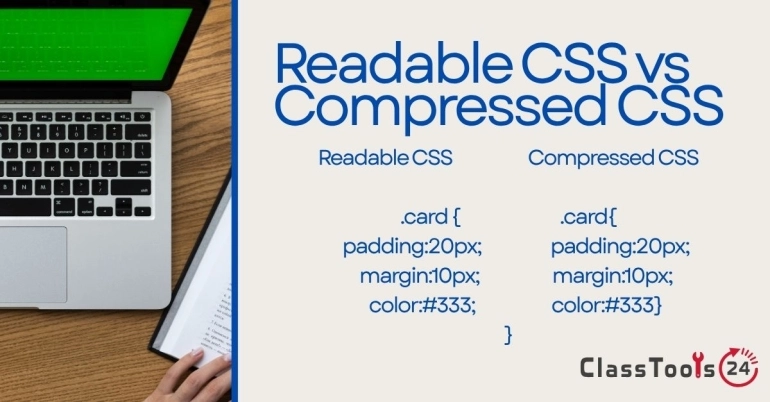
For example, readable CSS may look like this:
.card {
    background: white;
    padding: 20px;
    border-radius: 12px;
}
After compression, the same rule may become:
.card{background:white;padding:20px;border-radius:12px}
Both versions can produce the same visual result. The first version is easier for humans to edit. The second version is smaller and better suited for delivery. Understanding this difference helps students and beginner developers use compression responsibly.
Why CSS Compression Matters For Page Speed
Every file on a webpage must be downloaded by the browser. HTML, CSS, JavaScript, images, fonts, and other assets all contribute to loading time. CSS is especially important because the browser often needs it before the page can be displayed properly. If the CSS file is large, slow, or messy, the visible page can feel delayed.
Compression helps because smaller files usually download faster. The difference may be small on one tiny project, but it becomes more noticeable when a website contains many pages or when visitors use slower mobile connections. A school website, student portfolio, or classroom resource page should not feel heavy because of avoidable code size.
Page speed also affects user experience. Students and parents may leave a slow page before reading the information. A teacher opening a resource during class does not want to wait for a page to settle. A beginner developer testing a project should learn that performance is part of good web work, not an extra topic only advanced developers need.
Use Case 1: Student Web Design Assignments
Situation: A student builds a small website for a class project. The CSS file includes comments, indentation, unused sections, and repeated experiments from earlier drafts.
Problem: The page works, but the code is heavier than necessary. The student may also submit a project folder that contains messy development files instead of a clean final version.
Solution: The student keeps the original readable CSS file for editing and uses the CSS compressor to create a smaller final copy. The compressed version can be linked in the submitted or published page, while the readable version remains available for review or future changes.
Result: The project becomes more professional. The student learns a real web development habit: write readable code while building, then prepare optimized files for publishing.
Use Case 2: Classroom Websites And Resource Pages
Situation: A teacher or school team creates a classroom page with announcements, links, images, forms, and student resources. The page is updated often and may be opened by families on different devices.
Problem: If the page becomes slow, users may miss important information. Large images are usually the first issue, but CSS and other files can also add unnecessary weight.
Solution: Before publishing, the CSS file can be compressed. Images can also be prepared with tools such as the Image Compressor and Image Resizer. Together, these steps make the page lighter and easier to open.
Result: The classroom page loads more smoothly, especially on mobile devices or weaker internet connections. Families, students, and teachers can reach information with less delay.
Use Case 3: Beginner Developer Portfolios
Situation: A beginner developer creates a portfolio to show school projects, practice websites, certificates, and design examples. The portfolio may include several CSS files copied from different practice exercises.
Problem: The portfolio can become inconsistent and slow. A developer may focus only on how the page looks and forget that file size and loading speed also affect the visitor experience.
Solution: The developer reviews the CSS, removes unused code when possible, and compresses the final stylesheet. They keep a readable source version in a separate folder or repository so future editing remains easy.
Result: The portfolio feels cleaner and more reliable. The developer also demonstrates practical understanding of performance, which is valuable beyond the classroom.
Use Case 4: Testing Before Publishing
Situation: A student or teacher prepares a page that will be shared publicly. It may be a school club page, event notice, project showcase, or digital learning resource.
Problem: If the CSS is compressed without testing, a small syntax issue or accidental paste mistake may affect layout. Some beginners may also replace their only readable copy with the compressed version.
Solution: The safer workflow is to duplicate the CSS file first. Compress the copy, link it in the page, and test the page in a browser. Check headings, buttons, grids, spacing, mobile layout, and printed view if needed.
Result: The page receives the benefit of a smaller CSS file while the original remains safe for editing. This reduces stress when changes are needed later.
How To Compress CSS Safely
- Finish the main design work first.
- Save a readable copy of the CSS file.
- Open the CSS Compressor.
- Paste the CSS code into the input area.
- Run the compression or minification process.
- Copy the compressed output into a new file.
- Link the compressed file in the test version of the page.
- Open the page and check that the design still works.
- Test on desktop and mobile screen sizes.
- Keep the readable source file for future editing.
This process is simple, but the order matters. Compressing before the design is finished can make editing harder. Compressing without keeping a source copy can create problems later. Good workflow protects both performance and maintainability.
Common Problems CSS Compression Helps Solve
- CSS files are larger than needed for a simple page.
- Student projects include too many comments and blank lines in the final version.
- A portfolio or classroom page feels slower than expected.
- A website folder looks messy before submission or publishing.
- Beginners do not understand the difference between source code and production code.
- Pages need to load better on mobile connections.
- Teachers want students to learn practical web performance habits.
Comparison: Readable CSS And Compressed CSS
| Task | Readable CSS | Compressed CSS |
|---|---|---|
| Learning and editing | Best for students and developers while writing code. | Harder to edit because spacing and comments are removed. |
| Publishing a page | Works, but may include unnecessary size. | Better for final delivery because the file is smaller. |
| Teacher review | Useful when the teacher needs to understand the student code. | Not ideal for grading code readability. |
| Website speed | May load slightly slower when files are large. | Can improve loading by reducing file size. |
| Future changes | Easy to update later. | Should be regenerated from the readable source. |
Important Quality Checks
After compression, always test the page. Do not assume the result is correct only because the compressor produced output. Open the page in a browser and inspect the parts that depend on CSS: layout, spacing, navigation, forms, buttons, tables, cards, and responsive sections.
Also check whether the original CSS contained special comments that were needed for licenses, documentation, or team notes. Many compressors remove comments by default. In professional projects, some comments may need to be preserved. For school projects, this is a useful discussion point because it teaches students that optimization should be done with understanding.
Privacy And Responsibility
CSS usually does not contain student names, grades, or private photos, but it can still include references to file paths, background images, school project names, or internal assets. Before sharing a project publicly, check the whole folder, not only the CSS. A fast page is useful, but a responsible page also protects private information.
If a project contains classroom images, student work, or school documents, prepare those files carefully before publishing. Tools such as image compression and conversion can help with format and size, but they do not remove sensitive content from the image itself.
Final Thought
CSS compression is a small step with a practical purpose. It helps websites load faster, makes project folders cleaner, and teaches students that web development includes performance, not only appearance. Used at the right time, it supports better classroom projects, smoother websites, and stronger beginner development habits.
The best approach is simple: write clear CSS while building, keep a readable source copy, compress only the final version, and test the page after compression. That workflow gives students and teachers the benefit of smaller files without losing the clarity needed for learning and future edits.