Six practical reasons smaller image files help websites, classrooms, uploads, and everyday digital work.
When Large Images Slow Everything Down
A teacher adds several photos to a classroom newsletter and the file becomes too large to email. A student uploads a project image to a learning platform and the submission fails. A school website looks good, but families on mobile connections wait too long for pages to load. The images may be useful, but their file size creates friction.
Image compression matters because it reduces image file size while keeping the image useful for its purpose. A compressed image is usually easier to upload, send, store, and display. This is helpful for websites, classroom documents, student portfolios, forms, presentations, and everyday school communication.
The point is not to make every image as small as possible. A worksheet diagram still needs readable labels. A project photo still needs clear evidence. A school event image still needs to look presentable. Good compression balances file size with quality.
If you want a deeper explanation of how compression works, you can read the related guide on what image compression is. This article focuses on why compression is important in real situations.
Reason 1: Faster Website Loading
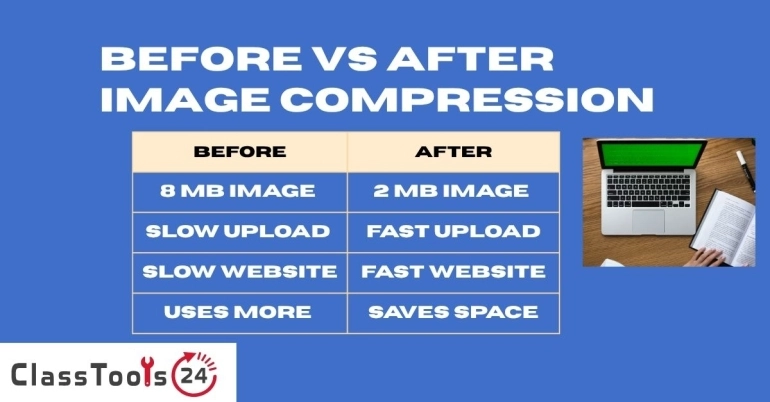
Images are often the heaviest part of a webpage. A website may have clean text, simple buttons, and good layout, but one oversized image can slow the page down. This is common on school websites, student portfolios, classroom blogs, club pages, and event announcement pages.
When images are compressed, the browser has less data to download. That can make the page appear faster, especially for visitors using phones or slower internet connections. A faster page is easier to use and less frustrating for students, parents, teachers, and visitors.
For beginner developers, this is an important habit. A good website is not only about how it looks on the creator’s laptop. It should also load reasonably well for other people. Compressing images before publishing is one of the simplest performance improvements a student can learn.
Reason 2: Easier Assignment Uploads
Students often take photos of handwritten work, project models, science observations, art assignments, or notebook pages. Modern phone photos can be very large. The image may look fine in the gallery, but the file may be too heavy for a school platform or form.
Compression helps by reducing file size before submission. The student can upload faster and avoid repeated failure messages. This is especially useful when a deadline is close and the student does not have time to retake images or change devices.
Students should still check the compressed image before submitting it. Handwriting, labels, diagrams, and project evidence must remain readable. A smaller file is only helpful if the teacher can still review the work clearly.
Reason 3: Better Classroom Documents And Slides
Teachers regularly prepare worksheets, slide decks, revision packs, forms, certificates, and classroom announcements. Images make these materials clearer, but they can also make files heavy. A slide deck with many uncompressed photos may become slow to open or difficult to upload.
Compressing images before placing them into documents can keep the final file manageable. It also makes it easier to share materials through email, classroom platforms, or school websites. This is a practical time-saver, especially when resources are reused across several classes.
Quality matters here. A photo used for decoration can usually handle more compression. A screenshot with small text or a diagram with labels needs more care. Teachers should check the final document after compression to confirm that the image still supports the lesson.
Reason 4: Lower Bandwidth Use
Not every student or parent has a fast connection. Some people open school pages on mobile data. Others use older devices or shared networks. Large images can make pages and files harder to access for these users.
Compressed images require less data transfer. This helps pages load faster and reduces the amount of data needed to open content. For schools, educational blogs, student websites, and online resources, this can make information more accessible.
This is not only a technical issue. If a parent cannot open a school notice because the page is too heavy, the communication fails. If a student cannot download a resource before class, learning time is affected. Compression supports access.
Reason 5: Storage Savings
Images take up space. A teacher may collect hundreds of project photos, event pictures, worksheet images, and classroom screenshots during a school year. Students may save portfolio images, assignment evidence, scanned pages, and presentation visuals. Without compression, storage fills quickly.
Compressed images use less storage space. This helps on laptops, phones, cloud drives, school accounts, and website hosting. It also makes backup and file organization easier because folders are not filled with unnecessarily large files.
Storage savings are especially useful when files need to be archived. A school team keeping event images, certificates, and project records can save significant space by preparing images sensibly before storing them long term.
Reason 6: Better Website SEO And User Experience
Search engines and users both care about speed. A page that loads slowly can lose visitors before they read the content. While image compression is not the only factor in search performance, it is one of the practical steps that can improve page experience.
For educational websites, fast loading supports trust. A visitor looking for a tool, guide, worksheet, or classroom resource should be able to open the page without waiting through heavy images. Smaller image files help make the experience smoother.
Good compression also supports mobile usability. Many visitors now browse from phones. If images are too large, the page may feel delayed or unresponsive. Compressing images helps the site feel lighter and easier to use.
How To Compress Images In A Sensible Workflow
- Choose the clearest original image.
- Remove unnecessary background with an Image Cropper if needed.
- Resize the image if the dimensions are much larger than the task requires.
- Use the Image Compressor to reduce file size.
- Open the compressed image and check quality.
- Use the compressed copy for upload, sharing, or publishing.
- Keep the original file until the task is fully finished.
This workflow prevents a common mistake: compressing the same file again and again until the image becomes unclear. It is usually better to keep the original and create a fresh compressed copy when needed.
Common Problems Image Compression Solves
- Website pages load too slowly because images are too large.
- Students cannot upload assignment photos.
- Teachers cannot email heavy slide decks or worksheets.
- School forms reject large image files.
- Classroom pages use too much mobile data.
- Student portfolios feel slow on phones.
- Cloud storage fills with oversized images.
- Newsletters and announcements become difficult to share.
Comparison: Compressed Images And Large Originals
| Task | Compressed Images | Large Original Images |
|---|---|---|
| Website loading | Pages usually load faster and feel lighter. | Pages may feel slow, especially on mobile. |
| Assignment uploads | Files are easier to submit and review. | Uploads may fail or take too long. |
| Teacher documents | Worksheets and slides are easier to share. | Files can become heavy and hard to send. |
| Storage | Folders and cloud drives stay more manageable. | Storage fills faster over time. |
| Image quality | Needs checking after compression. | Often keeps more detail but may be impractical. |
When Not To Over-Compress
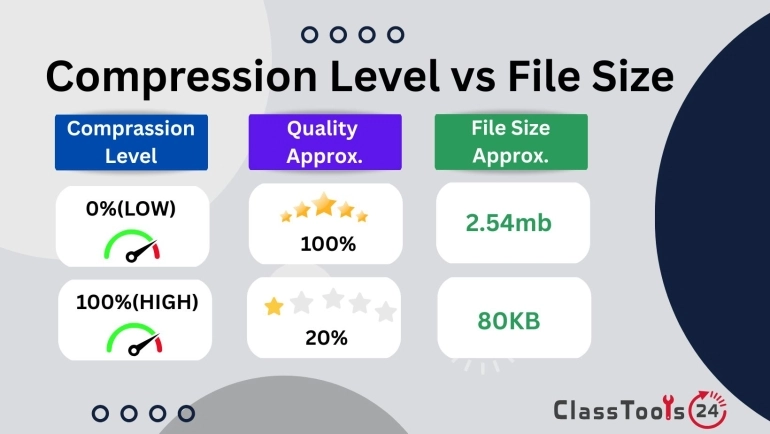
Compression can create problems if it is pushed too far. Text may become blurry, faces may lose detail, diagrams may become hard to read, and colors may look rough. This matters in school work because images often contain evidence, labels, handwriting, or instructional details.
Do not judge only by file size. Open the compressed image and check the actual content. If the teacher needs to read a math solution, the writing must remain clear. If the image is part of a science report, the labels must remain visible. If the image is for a portfolio, it should still represent the work well.
Privacy Reminder
Compression changes file size, but it does not remove private information. Student names, faces, addresses, school documents, grades, login details, and background items may still be visible. Before compressing and sharing an image, check what the image contains.
If private content is visible, crop it out or use a safer image before uploading. Tools can help prepare files, but privacy decisions still belong to the user.
FAQ
Why is image compression important?
It reduces file size, which makes images easier to upload, download, store, email, and display on websites.
Does image compression reduce quality?
It can, depending on the compression type and level. Good compression keeps the image useful while reducing file size.
Should students compress assignment photos?
Yes, if the photo is too large to upload. They should always check that handwriting and details remain readable.
Is compression useful for websites?
Yes. Compressed images can improve loading speed and user experience, especially on mobile devices.
Is compression the same as resizing?
No. Resizing changes image dimensions. Compression reduces file size. Many workflows use both.
Which images need careful compression?
Screenshots, diagrams, forms, certificates, and images with small text need careful checking after compression.
Final Thought
Image compression is important because it solves real problems. It helps websites load faster, students submit work, teachers share materials, and schools manage files more easily. The benefit is practical, not theoretical.
The best compression keeps the image clear enough for its purpose while removing unnecessary weight. When users learn that balance, digital work becomes easier to send, open, store, and publish.