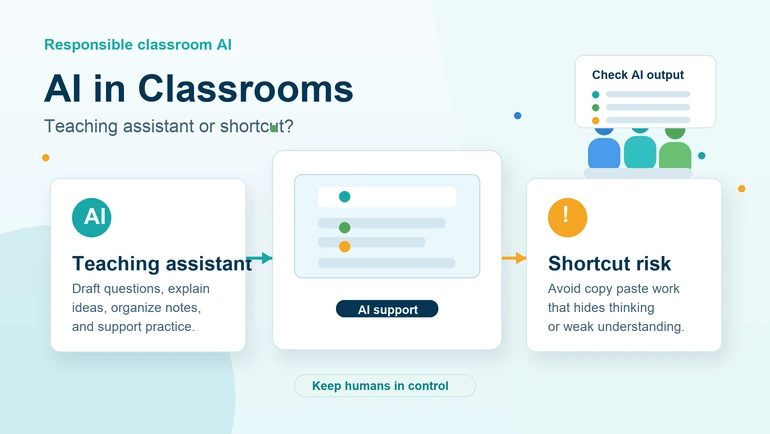
Ein praktischer Leitfaden für Lehrkräfte und Schüler zum Einsatz von KI als Lernunterstützung, ohne dabei Denkvermögen, Anstrengung oder wissenschaftliche Redlichkeit zu untergraben.
KI im Klassenzimmer: Unterrichtshilfe oder Abkürzung?
KI im Klassenzimmer ist längst keine Zukunftsidee mehr. Schülerinnen und Schüler nutzen KI-Werkzeuge bereits, um Lektüren zusammenzufassen, Ideen für Aufsätze zu sammeln, schwierige Themen erklären zu lassen, Lernnotizen aufzubauen, Fragen zu erzeugen und Präsentationen vorzubereiten. Auch Lehrkräfte probieren KI für Unterrichtsplanung, Klassenaktivitäten, Tests, Feedback und die Vorbereitung von Material aus. Die Frage ist nicht, ob KI in die Bildung gehört. Die bessere Frage lautet, wie man sie nutzt, ohne dass sie zur Abkürzung am eigentlichen Lernen vorbei wird.
Umsichtig eingesetzt, kann KI wie eine hilfreiche Unterrichtsassistenz wirken. Sie kann einer Lehrkraft helfen, aus einem langen Text Diskussionsfragen zu machen, einer Schülerin beim Wiederholen eines schwierigen Kapitels helfen oder einer Klasse helfen, aus Notizen ein Foliengerüst zu erstellen. Schlecht eingesetzt, wird sie zur Kopiermaschine, die das Denken verringert, schwaches Verständnis verdeckt und Probleme mit der wissenschaftlichen Redlichkeit schafft.
Dieser Beitrag nimmt eine abwägende Haltung ein. KI kann Lehren und Lernen unterstützen, aber sie sollte weder das Lesen noch das Argumentieren, Schreiben, Diskutieren, Üben oder das Urteil der Lehrkraft ersetzen. Am stärksten ist der Einsatz von KI im Unterricht dort, wo Menschen die Kontrolle behalten. Die Lehrkraft setzt das Lernziel. Die Lernenden erledigen das Denken. Die KI hilft, den Stoff zu ordnen, zu erklären und zu üben. Diese abwägende Sicht deckt sich mit dem UNESCO-Leitfaden für generative KI in der Bildung, der KI als Werkzeug begreift, das ein am Menschen ausgerichtetes Klassenzimmer unterstützen und nicht das Urteil der Lehrkraft oder das Denken der Lernenden ersetzen soll.
Warum KI in der Bildung immer verbreiteter wird
KI-Werkzeuge sind beliebt, weil sie Reibung wegnehmen. Wer im Stoff feststeckt, kann um eine einfachere Erklärung bitten. Eine Lehrkraft, die zehn Übungsfragen braucht, bekommt einen ersten Entwurf. Eine Gruppe, die eine Präsentation vorbereitet, macht aus Notizen eine Gliederung. Das sind echte Vorteile, gerade wenn die Zeit knapp ist.
Ein Klassenzimmer ist ein betriebsamer Ort. Lehrkräfte jonglieren Planung, Leistungsbewertung, Abläufe, Unterstützung einzelner Lernender, Kommunikation und Korrekturen. Schülerinnen und Schüler jonglieren Hausaufgaben, Projekte, Tests, Vorträge und digitale Abgaben. KI-Werkzeuge können bei den Teilen des Lernens helfen, in denen es darum geht, Informationen zu ordnen, erste Entwürfe zu erstellen oder ein Format in ein anderes zu überführen.
Aber Tempo ist nicht dasselbe wie Lernen. Wenn die KI einer Schülerin die fertige Antwort liefert, bevor sie selbst nachgedacht hat, spart das Werkzeug zwar Zeit, schwächt aber das Verständnis. Deshalb brauchen Schulen praktische Gewohnheiten im Umgang mit KI, nicht bloß Begeisterung oder Angst.
KI als Unterrichtsassistenz
Als Assistenz funktioniert KI am besten, wenn sie Lehrkräften und Lernenden beim Vorbereiten, Wiederholen oder Üben hilft. Sie soll den Lernprozess stützen, nicht verdecken. Eine Lehrkraft kann sich mit KI einen Entwurf für Wiederholungsfragen erstellen lassen und ihn dann für die konkrete Klasse überarbeiten. Ein Schüler kann sich mit KI ein Kapitel zusammenfassen lassen, die Zusammenfassung anschließend mit dem Originaltext vergleichen und Fehlendes ergänzen.
So kann eine Lehrkraft etwa mit dem Fragengenerator Übungsfragen zu einem Unterrichtsthema erstellen. Die Lehrkraft entscheidet weiterhin, welche Fragen fachlich stimmen, welche zum Lernziel passen und welche zu leicht oder zu schwer sind. Die KI-Ausgabe wird zum Entwurf, nicht zur letzten Instanz.
Genauso kann ein Schüler mit der Studenten-KI-Zusammenfassung aus einem langen Artikel kürzere Notizen machen. Er sollte die Quelle trotzdem lesen, die Zusammenfassung prüfen und die Hauptgedanken mit eigenen Worten neu formulieren. Dieser Schritt ist entscheidend, denn gelernt wird beim Verknüpfen der Gedanken, nicht dann, wenn das Werkzeug sauberen Text ausgibt.
KI als Abkürzungsproblem
Zum Abkürzungsproblem wird KI, sobald sie genau die Arbeit ersetzt, die eine Aufgabe eigentlich einüben soll. Wenn es darum geht, das Schreiben einer Argumentation zu üben, umgeht das Kopieren eines KI-Aufsatzes diese Fähigkeit. Wenn es darum geht, eine Matheaufgabe zu lösen, umgeht das Abschreiben des Endergebnisses den Rechenweg. Wenn es darum geht, ein Kapitel zu lesen und zu erklären, umgeht der KI-Einsatz ohne Lesen das Textverständnis.
Das Problem ist nicht, dass KI da ist. Das Problem ist die verdeckte Nutzung, die Anstrengung, Denken und Verantwortung herausnimmt. Lernende halten sich womöglich für effizient, verpassen dabei aber das Üben, das langfristig Können aufbaut. Lehrkräfte bekommen womöglich saubere Arbeiten, die nicht zeigen, was die Person tatsächlich verstanden hat.
Deshalb sollten Regeln zur KI klar sein. Lernende müssen wissen, wann KI erlaubt ist, welche Art von KI-Hilfe in Ordnung geht und was eigenständig zu erledigen ist. Eine gute Regel ist schlicht: KI darf dir beim Vorbereiten, Üben, Ordnen und Überarbeiten helfen, aber sie soll das Lernen nicht für dich übernehmen.
Gesunde KI-Nutzung im Vergleich zur Abkürzung
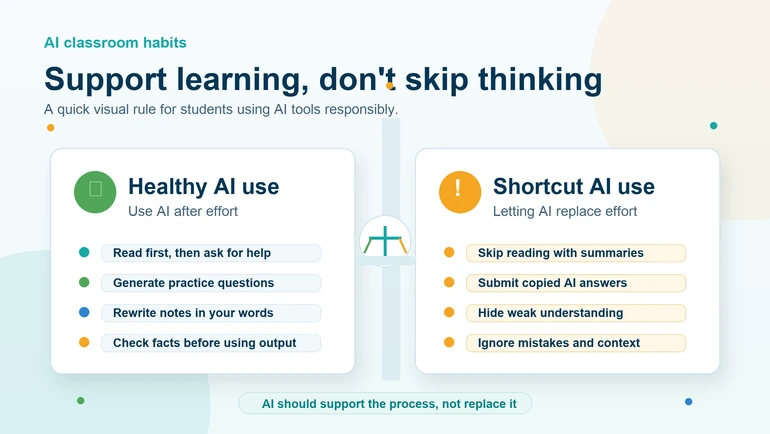
| Gesunde KI-Nutzung | KI als Abkürzung |
|---|---|
| Nach dem Lesen des Materials um eine einfachere Erklärung bitten | Die Lektüre überspringen und nur die KI-Zusammenfassung nutzen |
| Übungsfragen zum Wiederholen erzeugen | KI-Antworten abgeben, ohne sie verstanden zu haben |
| Mit KI Notizen zu einem Lernplan ordnen | Die KI die ganze Aufgabe ohne eigenen Einsatz schreiben lassen |
| Prüfen lassen, ob ein Absatz verständlich ist | Eigenen Text durch kopierten KI-Text ersetzen |
| Aus Notizen ein Foliengerüst erstellen und es dann überarbeiten | KI-Ausgaben ohne Durchsicht oder Vorbereitung präsentieren |
Praktische Klassenregeln für KI
Lehrkräfte brauchen keine ausgefeilte Richtlinie für jedes denkbare KI-Werkzeug. Was sie brauchen, ist ein klarer Maßstab für die Klasse, den sich alle merken können. Die Regeln sollten sich um Lernen, Ehrlichkeit und Transparenz drehen.
- KI als Unterstützung, nicht als Ersatz: KI darf erklären, ordnen oder beim Üben helfen, aber lesen, denken und schreiben müssen die Lernenden weiterhin selbst.
- Den Lernweg sichtbar machen: Lernende sollten erklären können, wie sie zu einer Antwort gekommen sind oder ein Projekt aufgebaut haben.
- Jedes KI-Ergebnis prüfen: KI kann sich irren, den Zusammenhang verfehlen oder schwach formulieren.
- Ehrlich über KI-Hilfe sprechen: Wenn eine Aufgabe KI zulässt, sollten Lernende angeben, wie sie sie genutzt haben.
- Private Informationen schützen: Persönliche Daten, Noten, Passwörter oder interne Schulunterlagen gehören nicht in KI-Werkzeuge.
Wie Lehrkräfte KI sinnvoll einsetzen
Lehrkräfte können mit KI Vorbereitungszeit sparen und trotzdem die Hoheit über den Unterricht behalten. Am sichersten ist es, KI für Entwürfe und Begleitmaterial zu nutzen und alles durchzusehen, bevor die Klasse es zu sehen bekommt.
Eine Lehrkraft kann etwa ein Unterrichtsthema in ein Fragenwerkzeug einfügen und sich Einstiegsfragen, Abschlussfragen oder Wiederholungsimpulse erzeugen lassen. Danach kann sie schwache Fragen streichen, den Schwierigkeitsgrad anpassen und Beispiele aus dem Unterricht ergänzen. Das spart Zeit, ohne die Qualität zu senken.
KI kann auch helfen, aus Notizen der Lehrkraft eine Präsentationsgliederung zu machen. Der Präsentationsfolien-Generator kann aus Notizen oder Dokumenten Folientitel und Stichpunkte erzeugen. Die Lehrkraft ergänzt anschließend Bilder, Beispiele aus der Klasse, Diskussionspunkte und Verständnisfragen.
Das ist wichtig, weil Lehrkräfte ihre Zeit nicht damit verbringen sollten, Material zu formatieren. KI kann bei der Struktur helfen, aber Urteilsvermögen, Kontext, Einfühlung und Kenntnis der Klasse bringt die Lehrkraft mit.
Wie Lernende KI nutzen, ohne das eigene Denken abzugeben
Lernende sollten KI so einsetzen, dass sie dadurch aktiver werden und nicht passiver. Eine brauchbare Gewohnheit ist, die KI erst nach einem ehrlichen eigenen Versuch um Hilfe zu bitten. Also: erst das Kapitel lesen, eigene Notizen schreiben, dann die KI zum Vergleichen, Klären oder Abfragen nutzen.
KI lässt sich auch zum Selbstlernen nutzen. Man kann sich Übungsfragen, Kernpunkte oder eine Wiederholungsgliederung geben lassen. Aber die Fragen sollte man beantworten, bevor man sich die Erklärungen ansieht. Zusammenfassungen sollte man mit eigenen Worten neu schreiben. Und man sollte das Thema erklären können, ohne die KI-Antwort abzulesen.
Eine einfache Regel für Lernende lautet: Wenn du die Antwort nicht erklären kannst, hast du sie noch nicht gelernt. KI kann dich auf dem Weg dorthin unterstützen, aber sie sollte die Lücke nicht verdecken.
Wo KI in den Lernprozess passt
- Vor dem Lernen: KI nutzen, um ein Thema vorab zu überfliegen, Schlüsselbegriffe aufzulisten oder einen Lernplan zu erstellen.
- Während des Lernens: KI nutzen, um schwierige Gedanken erklären zu lassen, Beispiele zu erzeugen oder Übungsfragen zu stellen.
- Nach dem Lernen: KI nutzen, um Notizen durchzugehen, Abfragekarten-Impulse zu erstellen oder zu prüfen, ob die eigene Zusammenfassung verständlich ist.
- Vor der Abgabe: KI beim Überarbeiten behutsam einsetzen, die Arbeit aber als eigene behalten und die Regeln der Klasse einhalten.
KI und wissenschaftliche Redlichkeit
Redlichkeit wird schwieriger, wenn sich in kurzer Zeit geschliffener Text erzeugen lässt. Das heißt nicht, dass jede Nutzung von KI Betrug wäre. Es heißt, dass Aufgaben klarere Erwartungen brauchen. Lehrkräfte sollten festlegen, ob KI erlaubt ist, welche Art von Hilfe erlaubt ist und wie Lernende sie kenntlich machen sollen.
Manche Aufgaben sollten KI-frei bleiben, weil es um eigenständiges Schreiben, eigenes Argumentieren oder um eine Leistungsbewertung geht. Bei anderen darf KI beim Sammeln von Ideen oder beim Überarbeiten helfen. Entscheidend ist die Klarheit. Lernende sollten nicht raten müssen.
Lehrkräfte können auch verlangen, dass Lernende ihren Arbeitsweg darlegen. Kurze Reflexionen, mündliche Nachfragen, Entwürfe, Gliederungen und Schreiben im Unterricht zeigen, ob eine Arbeit verstanden wurde. Das ist besser, als sich allein auf Erkennungsprogramme zu verlassen, die fehleranfällig und belastend sein können.
KI sollte den Menschen im Unterricht nicht ersetzen
KI kann erklären, zusammenfassen und Übungsmaterial erzeugen, aber sie kennt den ganzen Menschen nicht. Eine Lehrkraft bemerkt Verwirrung, Selbstvertrauen, Anstrengung, Verhalten, die Stimmung in der Klasse und den persönlichen Hintergrund. Eine Lehrkraft kann entscheiden, wann sie das Tempo drosselt, wann sie jemanden fordert und wann ein Gespräch in der Klasse angebracht ist.
Dieses menschliche Urteil steht im Zentrum von Bildung. KI soll Routinearbeit verringern und das Üben unterstützen, nicht die Beziehung zwischen Lehrkraft und Lernenden ersetzen. Das beste Unterrichtsmodell lässt die Lehrkraft führen und nutzt KI als eines von vielen Werkzeugen.
Nützliche KI-gestützte Abläufe im Unterricht
- Vom Lesen zu Notizen: Erst lesen, dann mit einem Zusammenfassungswerkzeug die Kernpunkte abgleichen.
- Von der Stunde zu Fragen: Lehrkräfte erstellen Fragenentwürfe und überarbeiten sie für ihre Klasse.
- Von Notizen zu Folien: Lernende machen aus Recherchenotizen ein Foliengerüst und ergänzen eigene Beispiele.
- Material teilen: Lehrkräfte erzeugen einen QR-Code für freigegebene Links, Arbeitsblätter oder weiterführende Formulare.
- Wiederholungsroutine: Lernende erzeugen Übungsfragen und beantworten sie, ohne in die Quelle zu schauen.
Um freigegebene digitale Materialien in der Klasse zu teilen, hilft der QR-Code-Generator für Unterrichtslinks dabei, aus einem langen Link einen einfach scannbaren Code zu machen. Das ist praktisch für Arbeitsblätter, Lesestoff, Rückmeldeformulare und Unterrichtsaktivitäten.
Was verantwortungsvolle KI-Nutzung bringt
Richtig eingesetzt, kann KI das Lernen besser strukturieren. Sie hilft Lernenden, anzufangen, wenn sie feststecken. Sie hilft Lehrkräften, Material schneller vorzubereiten. Sie schafft mehr Gelegenheiten zum Üben. Und sie macht komplexe Themen zugänglicher.
Verantwortungsvolle Nutzung vermittelt außerdem eine wichtige heutige Fähigkeit: mit digitalen Werkzeugen zu arbeiten, ohne das eigene Urteil abzugeben. Die meisten Lernenden werden KI im Studium, im Beruf und im Alltag wiedertreffen. Schulen können ihnen schon jetzt bessere Gewohnheiten mitgeben, indem sie zeigen, wann KI hilft, wann sie schadet und wie man ehrlich bleibt.
Worauf zu achten ist
- Übermäßige Abhängigkeit: Lernende hören womöglich auf, es selbst zu versuchen, bevor sie die KI fragen.
- Schwache Überprüfung: KI-Antworten können souverän klingen und trotzdem falsch sein.
- Verlust der eigenen Stimme: Texte von Lernenden werden beliebig, wenn KI den persönlichen Ausdruck ersetzt.
- Datenschutzprobleme: Sensible Informationen sollten nicht unbedacht in Werkzeuge eingefügt werden.
- Unklare Regeln: Unsicherheit über das Erlaubte kann zu Konflikten zwischen Lernenden und Lehrkräften führen.
Fazit
KI im Klassenzimmer kann eine hilfreiche Unterrichtsassistenz sein oder ein Abkürzungsproblem. Den Unterschied macht die Art der Nutzung. Wenn Lehrkräfte klare Regeln setzen und Lernende im Lernprozess aktiv bleiben, kann KI Vorbereitung, Übung, Wiederholung und Struktur unterstützen. Wenn KI Lesen, Schreiben, Denken oder ehrliche Anstrengung ersetzt, untergräbt sie den Zweck von Bildung.
Es geht nicht darum, jedes Werkzeug zu verbieten oder jede Abkürzung hinzunehmen. Es geht um besseres Lernen. KI soll Lernenden helfen, klarer zu denken, nicht weniger. Sie soll Lehrkräften helfen, besseres Material vorzubereiten, und nicht deren Urteil ersetzen. Mit Sorgfalt eingesetzt, kann KI zu einer praktischen Stütze im Unterricht werden und das eigentliche Lernen trotzdem im Mittelpunkt lassen. Wie sich Lehrkräfte und Lernende dabei die Kontrolle bewahren, zeigt KI im Klassenzimmer, ohne echtes Lernen zu ersetzen.