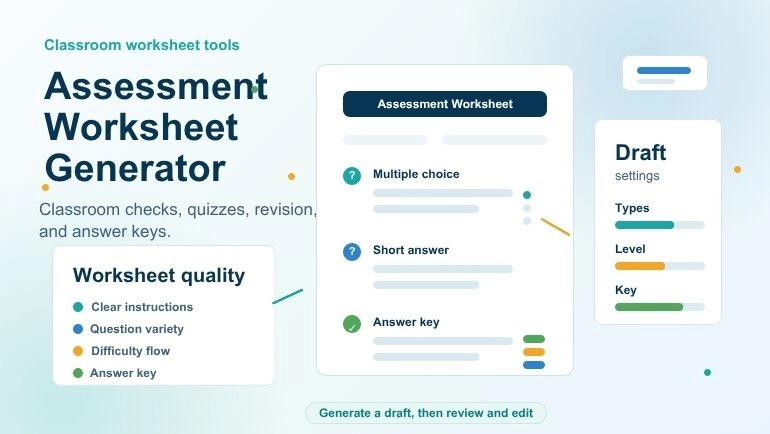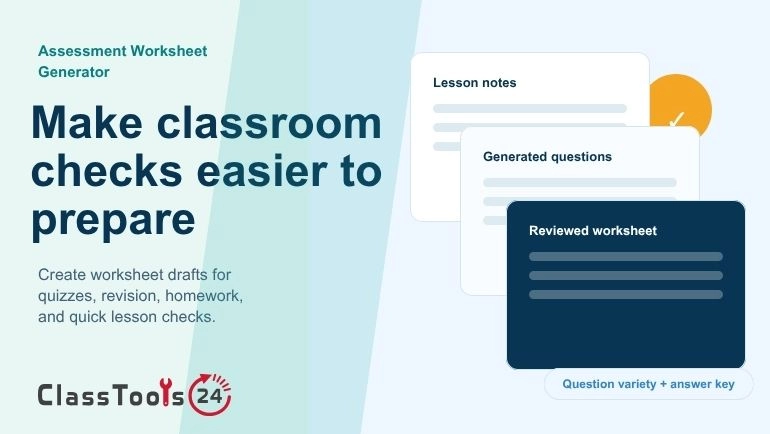
أنشئ أوراق تقييم أوضح لمراجعة الدروس، وتمارين المراجعة، والواجبات المنزلية، والاختبارات القصيرة، وقياس فهم الطلاب.
مولّد أوراق التقييم للتحقق الصفي
يساعد مولّد أوراق التقييم المعلّم على تحويل محتوى الدرس ونصوص القراءة وملاحظات المذاكرة والمواد الصفية إلى أسئلة منظَّمة يستطيع الطلاب الإجابة عنها. فبدل كتابة كل سؤال من صفحة فارغة، ينطلق المعلّم من مسودة جاهزة، ويراجع الناتج، ويضبط مستوى الصعوبة، فيصل إلى ورقة صالحة للاستخدام في الحصة بوقت أقصر.
أوراق التقييم مفيدة لأنها تُظهر ما فهمه الطلاب بعد الدرس. ويمكن استخدام الورقة للتحقق السريع، أو كواجب منزلي، أو لمراجعة قبل اختبار قصير، أو كنشاط يتركه المعلّم للمعلّم البديل، أو في حصة مراجعة قبل الاختبار. وحين تتضمن الورقة أسئلة واضحة ونموذج إجابة، يصبح التصحيح أيسر على المعلّم والمراجعة الذاتية أيسر على الطالب.
تشرح حالة الاستخدام هذه كيف يستفيد المعلّمون من Assessment Worksheet Generator في إعداد أوراق تقييم عملية دون التفريط في جودتها. فالأداة قد توفّر الوقت، لكن المعلّم يبقى صاحب القرار في ما يدخل الورقة النهائية، وفي عدالة الأسئلة، وفي علاقة النشاط بهدف الدرس.
لماذا ما زالت أوراق التقييم مفيدة
تحتفظ هذه الأوراق بقيمتها لأنها تمنح الصف مهمة محددة المعالم. فهي تُطبع، أو تُشارَك رقميًا، أو تُحَل داخل الحصة، أو تُعطى واجبًا منزليًا، أو تُستعمل مادة للمراجعة. وهي تمنح المعلّم دليلًا ملموسًا على التعلّم: فمن خلال إجابات الطلاب يتبيّن ما ترسّخ، وما بقي ضعيفًا، وما يحتاج إلى شرح إضافي.
ليس من الضروري أن تكون الورقة الجيدة طويلة. فخمسة أسئلة محكمة قد تكشف أحيانًا أكثر مما يكشفه عشرون سؤالًا ضعيفًا. الغاية هي التحقق من الفهم لا ملء الصفحة، ولهذا تحديدًا تهمّ جودة الأسئلة. وهذا ينسجم مع مجموعة استراتيجيات التقويم التكويني لدى Edutopia، التي تفضّل عمليات التحقق السريعة غير المرصودة بدرجات على الاختبارات الطويلة حين يكون الهدف رصد الثغرات فور حدوثها.
يعرف المعلّم غالبًا ما الذي يريد أن يتدرّب عليه طلابه، غير أن صياغة أسئلة واضحة تستهلك وقتًا. ويُخرج مولّد أوراق التقييم مسودة أولى من مادة الدرس نفسها، فيبقى جهد أكبر للمراجعة وتحسين الورقة.
مشكلات صفية شائعة تعالجها هذه الأداة
- ضغط الصفحة الفارغة: لا حاجة لبدء كل ورقة من الصفر.
- ضيق وقت التحضير: تُبنى المسودة سريعًا من محتوى الدرس المتوفّر أصلًا.
- تنويع الأسئلة: يمكن الجمع بين أنماط مختلفة من الأسئلة بدل تكرار نمط واحد.
- إعداد نموذج الإجابة: الورقة المرفقة بإجاباتها تسهّل التصحيح والمناقشة بعده.
- دعم المراجعة: يتبيّن الطالب من الورقة ما يحتاج إلى مذاكرته بعد.
- التحضير لحصص البدلاء: الورقة الواضحة قد تُبقي الصف منشغلًا بالعمل حين يغيب معلّم المادة.
أفضل استخدامات الورقة في الصف
تحقق سريع في نهاية الحصة
بعد شرح موضوع جديد، يحتاج المعلّم عادة إلى معرفة ما إذا كانت الفكرة الأساسية قد وصلت. وهنا تصلح ورقة تقييم قصيرة للتحقق السريع: تُلصق ملاحظات الدرس في الأداة، وتُولَّد مجموعة صغيرة من الأسئلة، ويُعمل بها في الدقائق العشر الأخيرة.
التدرّب عبر الواجب المنزلي
يُفترض بالواجب أن يرسّخ ما تعلّمه الطالب لا أن يربكه بتعليمات غامضة. وتساعد الأداة على إعداد أوراق واجب من المادة نفسها التي استُخدمت في الحصة، فيبقى الواجب متّسقًا مع الدرس ويتدرّب الطلاب والموضوع ما زال طازجًا.
مراجعة قبل اختبار قصير
قبل الاختبار القصير يحتاج الطلاب إلى تدريب قريب من المادة التي سيُسألون عنها. وورقة المراجعة قد تساعدهم على استعادة المفردات والحقائق الأساسية والشروح والتطبيقات البسيطة.
وإذا احتاج الصف إلى أسئلة تدريب إضافية، يوفّر Question Generator مطالبات أخرى في الموضوع نفسه. وهذا مفيد حين يريد المعلّم ورقة عمل من جهة، وبنك أسئلة منفصلًا للمناقشة الشفوية أو العمل الجماعي من جهة أخرى.
ورقة للتحقق من القراءة
كثيرًا ما يُكلَّف الطلاب بقراءة نص من دون وسيلة بسيطة للتأكد من فهمهم له. وورقة التحقق من القراءة قد تسأل عن الأفكار الرئيسة والتفاصيل المهمة والمفردات وشروح قصيرة.
نشاط للمعلّم البديل
حين يغيب معلّم المادة، تساعد الورقة الواضحة على إبقاء الحصة منتجة. ويُستحسن أن تتضمن تعليمات بسيطة، وعددًا من الأسئلة يكفي للوقت المتاح، ونموذج إجابة للتصحيح لاحقًا.
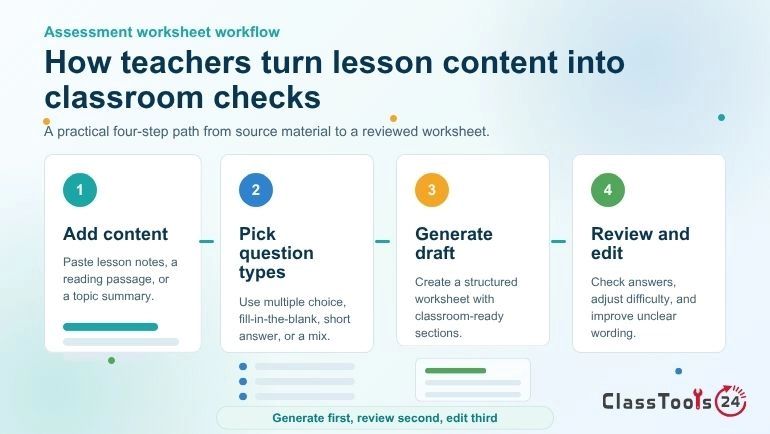
كيفية استخدام مولّد أوراق التقييم
- اختر المادة المصدر: ملاحظات الدرس، أو نصًا للقراءة، أو ملخصًا للموضوع.
- الصق النص في الأداة أو ارفع مستندًا من الصيغ المدعومة.
- اختر شكل الورقة أو نوع الأسئلة الذي يناسب النشاط.
- ولّد مسودة الورقة.
- اقرأ كل سؤال وكل إجابة قبل استخدام الورقة.
- أعد صياغة العبارات الغامضة، واحذف الأسئلة الضعيفة، واضبط مستوى الصعوبة.
- اطبع الورقة النهائية أو نزّلها أو شاركها مع طلابك.
أنواع الأسئلة المتاحة للمعلّم
| نوع السؤال | الأنسب له | نصيحة للمعلّم |
|---|---|---|
| الاختيار من متعدد | التحقق السريع، المفردات، الحقائق، تمييز المفاهيم | اجعل البدائل الخاطئة مقنعة ومنصفة في الوقت نفسه. |
| ملء الفراغات | المصطلحات الأساسية، التعريفات، القوانين، الأسماء، الحقائق القصيرة | لا تحذف كلمات كثيرة من الجملة الواحدة. |
| الإجابة القصيرة | الشرح، الاستدلال، المقارنة، الاستيعاب | اكتب مطالبات واضحة ليعرف الطالب حجم الإجابة المطلوبة. |
| ورقة مختلطة | مراجعة الدرس، الواجب المنزلي، التحضير للاختبار القصير | ابدأ بالبسيط ثم تدرّج نحو تفكير أعمق. |
كيف يراجع المعلّم الورقة المولَّدة
ينبغي دائمًا فحص الأوراق المولَّدة بالذكاء الاصطناعي قبل استعمالها في الصف. فقد يبدو السؤال المولَّد صحيحًا وهو مع ذلك مبهم أكثر مما ينبغي، أو سهل أكثر مما ينبغي، أو أعلى من مستوى الصف، أو بعيد عن الدرس. ومراجعة المعلّم هي ما يحوّل المسودة إلى مورد صفي نافع.
- تأكّد من صحة كل إجابة.
- احذف الأسئلة التي لا تخدم هدف الدرس.
- أعد صياغة العبارات المربكة.
- اضبط مستوى القراءة بما يناسب الصف.
- أضف أسئلة من عندك للمفاهيم المهمة.
- تحقّق من أن الورقة ليست أطول من الوقت المتاح.
- احتفظ بنموذج الإجابة منفصلًا عن نسخة الطالب.
ملاءمة صعوبة الورقة لمستوى الطلاب
ينبغي أن تناسب الورقة الطلاب لا الموضوع وحده. فالطلاب الأصغر سنًا قد يحتاجون إلى أسئلة قصيرة وصياغة مباشرة، بينما يكون الأكبر سنًا مستعدين للشرح والمقارنة والتطبيق.
استعمال الأوراق في المذاكرة والمراجعة
تساعد أوراق التقييم الطلاب في المذاكرة أيضًا. فمن يحل الورقة ثم يراجع نموذج الإجابة يرى ما يتقنه وما يحتاج إلى العودة إليه، وهذا أنشط بكثير من مجرد إعادة قراءة الملاحظات.
وإذا كان أمام الطالب فصل طويل أو مقال مطوّل، فبإمكانه أولًا إعداد ملاحظات أوضح عبر Student Ai Summarizer، ثم يحوّل المولّد المادة نفسها إلى أسئلة تدريب.
نصائح للأوراق المطبوعة
- اجعل العنوان واضحًا ومحددًا.
- أضف خانات الاسم والتاريخ والصف عند الحاجة.
- افصل أنواع الأسئلة بعناوين فرعية.
- اترك مساحة كافية للإجابات القصيرة.
- تجنّب الإخراج المزدحم.
- أبقِ التعليمات موجزة.
- اطبع نموذج الإجابة على حدة.
نصائح للأوراق الرقمية
إذا كانت الورقة ستُشارَك عبر الإنترنت، فتأكّد من أن الطلاب يعرفون طريقة حلها. فبعضهم سيكتب داخل مستند وبعضهم سيطبعها، ويجب أن توضّح التعليمات الصيغة المطلوبة.
وإذا تضمّنت الورقة قراءة إلكترونية أو مقطعًا مصورًا أو صفحة مرجعية، فبإمكان المعلّم مشاركة ذلك المصدر عبر QR Code Generator. ورمز الاستجابة السريعة مفيد على الأوراق المطبوعة وملصقات الصف والنشرات، لأن الطالب يمسح الرابط بدل كتابته يدويًا.
الخصوصية والاستخدام المسؤول
على المعلّمين تجنّب رفع معلومات الطلاب الخاصة أو الدرجات أو السجلات الشخصية أو التفاصيل الطبية أو كلمات المرور أو الوثائق المدرسية السرية إلى أي أداة على الإنترنت ما لم يكونوا مخوّلين بمعالجة تلك البيانات. وينبغي أن تتركّز المادة المصدر على محتوى الدرس لا على السجلات الخاصة.
أسئلة شائعة
ما ورقة التقييم؟
هي مجموعة أسئلة تُستخدم للتحقق مما فهمه الطلاب من درس أو نص قرائي أو موضوع أو مهارة.
هل يغني مولّد الأوراق عن تحضير المعلّم؟
لا. قد يُخرج مسودة مفيدة، لكن على المعلّم مراجعتها وتحريرها ومواءمتها مع هدف الدرس.
ما أنسب أنواع الأسئلة للتقييم؟
المزج بينها هو الأفضل عادة. فالاختيار من متعدد يفحص التمييز، وملء الفراغات يفحص الاستدعاء، والإجابة القصيرة تفحص القدرة على الشرح.
هل يمكن استعمال الأوراق دون رصد درجات؟
نعم. تصلح للتدريب والمراجعة وسؤال سريع في نهاية الحصة والتحقق من القراءة والواجب المنزلي أو تقييم صفي غير رسمي.
ما الطول المناسب لورقة التقييم؟
يتوقف ذلك على النشاط. فالتحقق السريع قد يكفيه خمسة أسئلة، أما ورقة المراجعة فقد تحتاج إلى أقسام عدة.
هل ينبغي للمعلّم تحرير الأسئلة المولَّدة؟
نعم. يُستحسن التحقق من الدقة وتحسين الصياغة وضبط الصعوبة وحذف كل سؤال لا يخدم الدرس.
الخلاصة
مولّد أوراق التقييم مفيد للمعلّمين الراغبين في مسودات أسرع دون التنازل عن التحكّم في الجودة. فهو يحوّل محتوى الدرس والنصوص القرائية والملاحظات والمستندات إلى أسئلة منظَّمة تصلح للتحقق الصفي والواجب المنزلي والمراجعة والاختبارات القصيرة وأنشطة المعلّم البديل. وتأتي أفضل النتائج حين يولّد المعلّم مسودة، ويراجعها بعناية، ويصوغها بما يناسب صفّه.
 هذه المادة حول
مولّد أوراق التقييم وأسئلة الامتحانات
افتح الأداة
هذه المادة حول
مولّد أوراق التقييم وأسئلة الامتحانات
افتح الأداة