A practical guide to using a random name wheel for students, teams, classroom turns, games, and group activities.
When Choosing A Name Becomes A Classroom Problem
A teacher asks for a volunteer, and the same confident students raise their hands. A group activity needs team leaders, but students begin arguing about who should go first. A class game needs a fair order, and everyone has an opinion. These are ordinary classroom moments, but they can take more time than expected.
Random selection can help when the goal is fairness. Instead of the teacher choosing by habit or students debating the order, a visible random tool gives everyone the same chance. The Wheel of Names turns a list of names or options into a spinning wheel. When the wheel stops, the selected name becomes the result.
This does not mean every classroom decision should be random. Teachers still need judgment, especially when grouping students by support needs, behavior, confidence, or learning level. But for low-stakes choices, warm-up activities, review games, presentation order, prize draws, or quick turns, a random wheel can make the process smoother and more transparent.
Students usually respond well because they can see the process. The wheel adds a small moment of attention and anticipation. More importantly, it reduces the feeling that the teacher is always choosing the same people. Used carefully, it supports participation without turning selection into a conflict.
What Is A Wheel Of Names?
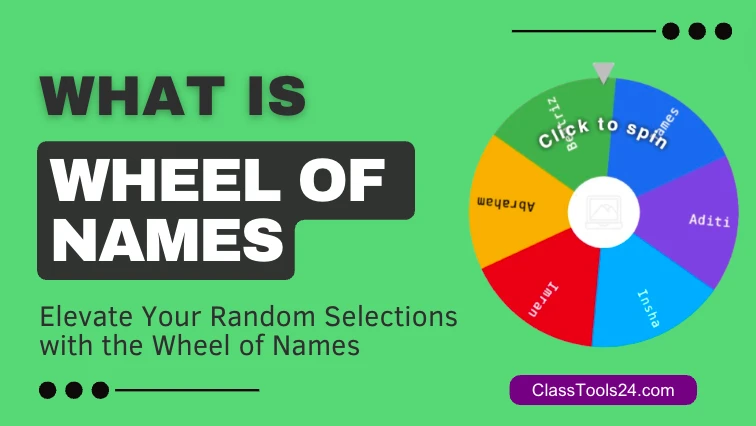
A Wheel of Names is an online random selection tool. The user enters names, topics, tasks, numbers, questions, or choices into a list. The tool places those entries around a wheel. When the wheel spins, it randomly selects one entry.
In a classroom, the entries might be student names, group numbers, discussion prompts, vocabulary words, book titles, review questions, or activity choices. Outside the classroom, the same tool can support giveaways, event draws, team decisions, and family games.
The value of the wheel is not only the random result. The visual process matters. Students can watch the wheel spin and understand that the result came from the list, not from the teacher privately choosing someone. That transparency can reduce complaints and help the activity move forward.
Why Random Selection Helps Teachers
Teachers make many small decisions during a lesson. Who answers first? Which group presents next? Which problem should the class solve? Which topic should be reviewed? Which student reads the next line? These decisions seem simple, but they can become repetitive or feel unfair if the same students are chosen often.
A random name wheel gives the teacher a quick alternative. It can invite quieter students into participation without the teacher appearing to target them. It can also keep confident students from dominating every activity. When students know the wheel may choose anyone, they are more likely to stay alert.
Random selection also helps with classroom energy. A wheel spin creates a short pause, a little suspense, and a clear result. That can be useful during revision games, vocabulary practice, group challenges, and warm-up questions. The tool adds structure without needing physical cards, sticks, dice, or printed slips.
Use Case 1: Choosing Student Turns Fairly
Situation: A teacher is running a discussion or review activity. Several students want to answer, while others avoid eye contact.
Problem: If the teacher always calls on volunteers, the same students may participate. If the teacher chooses directly, some students may feel singled out.
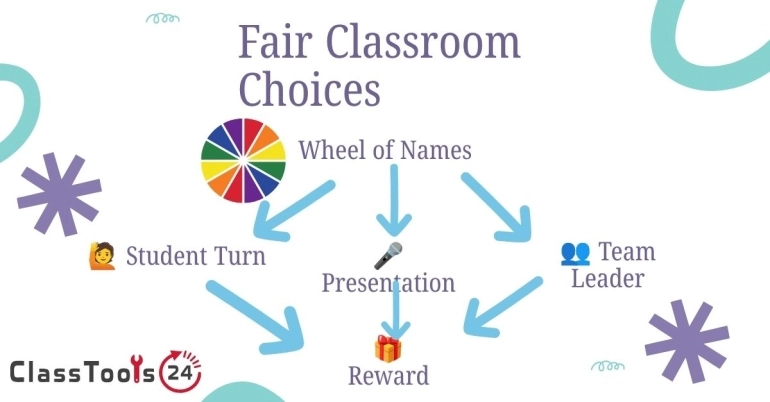
Solution: The teacher enters the names into the wheel and uses it to choose turns. The teacher can also remove a name after selection if each student should get one turn before repeats.
Result: Participation becomes more balanced. Students understand the selection process, and the teacher can manage turns without long debates.
Use Case 2: Setting Presentation Order
Situation: Students have completed group projects and need to present. Every group wants a different slot. Some want to go first, while others want more time.
Problem: Choosing order manually can create complaints. Students may feel the order favors one group over another.
Solution: The teacher places group names or numbers into the Wheel of Names and spins to build the order. The selected group presents first, then the teacher spins again for the next group.
Result: The order feels fair because every group is chosen the same way. The class can move into presentations faster.
Use Case 3: Review Games And Quiz Practice
Situation: A teacher wants to review vocabulary, formulas, historical events, grammar rules, or science terms before a test.
Problem: Review can become dull if the teacher simply reads questions from a list. Students may lose focus while waiting for their turn.
Solution: The teacher adds question categories, vocabulary words, or student names to the wheel. A spin chooses the next prompt or participant. For more variety, the teacher can pair the wheel with a Dice Roller for points or challenge levels.
Result: Review feels more active. Students watch the wheel, anticipate the result, and stay more involved in the activity.
Use Case 4: Group Activities And Team Roles
Situation: A group project needs roles such as presenter, recorder, timekeeper, materials manager, and discussion leader.
Problem: Students may choose familiar roles, avoid difficult roles, or argue about who should do what.
Solution: The teacher can enter role names into the wheel or use student names to assign the first role. For sensitive roles or support needs, the teacher can adjust the list before spinning.
Result: Role assignment becomes faster and less personal. Students experience different responsibilities over time.
Use Case 5: Classroom Rewards And Low-Stakes Draws
Situation: A teacher wants to choose a winner for a small classroom reward, reading challenge, quiz review, or participation activity.
Problem: Manual draws can feel unclear, especially if students cannot see how the winner was chosen.
Solution: The teacher enters eligible names and spins the wheel in front of the class. The result is visible to everyone.
Result: The draw feels transparent. Students can accept the result more easily because the process is open.
Use Case 6: Choosing Topics Or Writing Prompts
Situation: Students need a writing prompt, debate topic, project theme, or reading response question.
Problem: Some students spend too long choosing and delay the actual work. Others choose the easiest option every time.
Solution: The teacher enters topic choices into the wheel. Students spin individually or as a class. The selected prompt becomes the starting point.
Result: Students begin faster. The random prompt can also push them to try ideas they might not normally choose.
How To Use Wheel Of Names In A Classroom Workflow
- Decide whether random selection is appropriate for the task.
- Prepare the list of names, groups, roles, or prompts.
- Remove any entry that should not be part of the draw.
- Open the Wheel of Names.
- Paste or type entries into the list.
- Explain the rule before spinning.
- Spin the wheel where students can see it.
- Record the result if order matters.
- Remove selected entries when repeats are not allowed.
- Use teacher judgment if a result creates a real classroom issue.
The most important step is explaining the rule before the spin. Students should know whether the selected name must answer, may pass, earns points, chooses a teammate, or receives a role. Clear rules prevent confusion after the result appears.
Common Problems This Solves
- The same students answer every question.
- Groups argue about presentation order.
- Students feel the teacher is choosing unfairly.
- Class games need a quick random result.
- Review activities need more energy.
- Roles in group work need to be assigned quickly.
- Writing prompts or topic choices take too long.
- Small classroom rewards need a transparent draw.
Comparison: Wheel Of Names And Manual Selection
| Task | Using Wheel Of Names | Choosing Manually |
|---|---|---|
| Student turns | Everyone can see the random process. | Students may feel the same people are chosen. |
| Presentation order | Groups are ordered through a visible draw. | Arguments about order may take time. |
| Review games | The wheel adds anticipation and attention. | The activity may feel predictable. |
| Team roles | Roles can be assigned quickly. | Students may avoid harder roles. |
| Topic selection | Students begin faster with a chosen prompt. | Some students spend too long deciding. |
Quality And Classroom Trust
A random tool should be used with care. It is fair only when the list is fair and the rule is clear. If some students should not be included in a certain activity, remove them before spinning. If a student has an accommodation, anxiety concern, language need, or support plan, the teacher should make a professional decision instead of leaving the moment entirely to chance.
Random selection works best for low-stakes participation, games, order, prompts, and light classroom decisions. It should not replace teacher judgment for sensitive grouping, behavior decisions, grading, or situations where student wellbeing matters.
Privacy Reminder
When using student names, think about where the wheel is displayed. In a classroom, showing first names may be fine. In a public stream, recorded lesson, screenshot, or shared page, student names should be handled carefully. Use initials, group numbers, or fictional names when privacy matters.
Browser storage and saved lists can be convenient, but teachers should avoid storing sensitive student information unnecessarily. A random name wheel should help the activity, not create privacy concerns.
FAQ
Can teachers use Wheel of Names for classroom activities?
Yes. Teachers can use it for turns, review games, presentation order, topic choices, and group roles. It works best when the rules are explained before the spin.
Can students use it for group projects?
Yes. Students can use it to assign roles, choose topics, or decide order in a fair way. For important decisions, they should still check with the teacher.
Is Wheel of Names fair?
It is fair when every valid entry is added correctly and the rule is clear. The teacher should review the list before spinning.
Should selected names be removed after a spin?
If every student should get one turn before repeats, remove selected names. If repeated chances are allowed, keep all names on the wheel.
Can it be used without student names?
Yes. Teachers can use group numbers, table names, role cards, topic names, or question categories instead of student names.
Is it suitable for serious classroom decisions?
It is better for low-stakes choices. Sensitive decisions should use teacher judgment, not random selection alone.
Final Thought
The Wheel of Names is useful because it makes small classroom choices visible, quick, and fair. It can reduce arguments, widen participation, and add a little energy to review tasks and activities. The best results come when teachers use it with clear rules and good judgment.
Random selection should support the classroom, not control it. When used at the right moment, it helps students accept outcomes more easily and lets the teacher keep the lesson moving.