Resources for Teachers
Explore teacher-focused classroom resources, workflow guides, planning ideas, file support, and practical digital learning help.
Teacher guides for everyday classroom work
Clear ideas for planning, classroom routines, student support, and practical digital work.
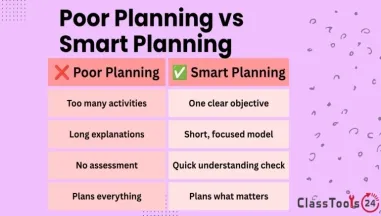
Classroom use cases for teachers
Practical examples that show how teachers can use classroom tools during real lessons and school tasks.
Flip Image for Assignments, Presentations, and Design
Learn how students, teachers, and beginner designers can use the Flip Image tool to fix image direction in assignments, presentations, posters, worksheets, classroom visuals, and simple desi[..]
Read more
Flip Image for School Assignments and Projects
Learn how students and teachers can use the Flip Image tool for assignments, project boards, worksheets, slides, posters, and classroom visuals when an image faces the wrong direction or doe[..]
Read more
Teacher resources for practical classroom work
Teachers often need support with the small digital jobs that sit around the real lesson. A worksheet needs a clean image. A student file is too large for the school platform. A class activity needs groups made fairly. A certificate needs to be prepared before the end of the week. A QR code needs to point students to a reading, form, video, or revision task without asking them to type a long link.
This teacher resources page is built for those everyday classroom moments. It brings together practical guides, use cases, and classroom tools that help teachers prepare materials, support students, reduce technical delays, and keep lessons moving. The focus is not on adding another complicated system. The focus is on simple workflows that teachers can use quickly and explain clearly to students.
A useful teacher resource should answer a real question. How do I prepare an image for a worksheet? How do I help students submit a file that opens correctly? How do I create a quick certificate for participation or reading progress? How do I share a resource with the whole class without copying a long address onto the board? These are not small issues when they happen during a live class. They can interrupt learning time, create confusion, and add pressure to an already busy lesson.
How teachers can use these resources
Start with the classroom guides when you want ideas, examples, or step-by-step thinking. The guides explain why a task matters, where students often make mistakes, and how a teacher can set up a cleaner routine. For example, a guide may explain how to prepare digital work before uploading it, how to keep classroom files organized, or how to use short activities to improve student engagement.
Use the classroom use cases when you want to see a task in context. A use case shows a real situation, the problem that appears, and the practical result after using a classroom tool or workflow. This is helpful for planning because it connects the resource to a school situation rather than describing it in a generic way.
Use the classroom tools section when you already know the task you need to complete. A teacher may need to generate a certificate, compress an image, create a QR code, prepare a PDF, or organize a classroom activity. The page gives quick access to tools that fit common teaching routines.
Common classroom situations this page supports
A teacher preparing a lesson may need to turn a long link into a QR code so students can open a form quickly. A teacher creating a classroom display may need to resize or compress images before printing or uploading them. A teacher managing group work may need a fair way to choose names, teams, or activity groups. A teacher recognizing student effort may need a certificate that looks clean and can be printed without spending extra time designing from scratch.
These situations are practical, but they also teach better digital habits. Students notice when a teacher models clear file names, readable images, working links, and well-prepared resources. Over time, those habits help students prepare their own assignments with fewer mistakes.
Good classroom workflow is not about using more technology. It is about reducing friction. If students can scan, open, read, complete, and submit without confusion, the lesson has more room for learning. If teachers can prepare resources faster, they have more time for feedback, discussion, and support.
Why clear workflows matter for teachers
Teachers work with many different materials during a normal week: worksheets, slides, images, PDFs, student submissions, classroom announcements, certificates, activities, projects, and revision resources. Each one can create a small technical problem. A file may be too large. An image may be sideways. A link may be difficult to type. A document may not print correctly. A student may upload the wrong version.
This page helps teachers think through those problems before they become interruptions. The best routine is simple: create the resource, check the file, adjust the size or format if needed, preview it, and then share it with students. That routine can be used for assignments, classroom displays, learning stations, student portfolios, newsletters, school events, and project work.
Teachers can also use these resources with students directly. A class can learn how to prepare files for submission, how to check an image before uploading it, how to share a link responsibly, or how to organize digital materials for a project. These are small skills, but they support independence.
Helpful classroom tools for teachers
The School Certificate Generator is useful for awards, reading progress, participation, classroom events, and end-of-term recognition. The Wheel of Names can support fair selection, group activities, speaking turns, and quick classroom games. The QR Code Generator helps teachers share links on handouts, boards, posters, and learning stations. The Image Compressor helps when images are too large for email, forms, slides, or school platforms. JPG to PDF is helpful when student photos, scanned work, or classroom images need to be shared as a cleaner document.
Used together, these resources support a practical classroom routine. Prepare the material, make it easier to access, reduce file problems, and help students complete the task with less confusion. That is the real value of this page for teachers.
Classroom tools that help teachers
Five practical tools for certificates, classroom groups, QR activities, image preparation, and printable files.


